
Cyber safety is something we all have to think about. These days, everything is digital and connected to the Internet… from our business documents to our family photos and videos. Everything.
Keeping our families safe online is an ongoing challenge that gets tougher all the time. So we’re sharing some advice in this post sponsored by Trend Micro, a global leader in cybersecurity.
How often do you talk to your kids about cyber safety? Are you careful enough with your own online behaviour? Are you doing everything you can to protect yourself and your family while online?
7 Ways To Help Keep Your Family Safe Online
- Talk to your children.
Just like everything in parenting, talking to your children openly and honestly is the first step.
Children are online at incredibly young ages and they have to be taught about online safety. They may instinctively know how to download apps and play the latest games on your smart phone, but they have no idea what the risks are.
These important conversations are not a one-time discussion. You need to start talking to your kids about online safety as soon as they’re old enough to touch your smart phone and keep reminding them until the day they leave for college… but maybe by then the roles will have reversed and they’ll be warning you.
- Don’t expect privacy online.
Despite apps, websites and devices all having privacy settings, we should always act as though there is no real privacy online.
I tell my kids, for everything they type — from an SMS text message to a post in a private Facebook group — they should consider what would happen if everyone was able to read it.
Whether it’s someone taking a screenshot and sharing their words or someone hacking into their account, everything digital is at risk.
Anything online is never truly private and we have to teach that concept from a young age.
- But still set up privacy settings.Â
While you should always be aware that anything you say online or anything you store online could be stolen or made public, you still need to take every precaution possible.
Ensure you and your kids set up all the privacy settings on each of your devices, as well as the privacy settings in each app, browser, and website.
- Have kids ask permission before downloading apps and games.
Kids are constantly wanting to download new games from the app store. Have them ask you before they download anything new.
Often the games are free, so it’s easy to just say “yes” whenever they want to download another. But you should make sure you know what they’re downloading and check that it’s safe.
My daughters’ iPad is set up with a child’s account connected to my family account, so whenever they want to download an app, I’m sent an approval notification.
If they’re playing games on my iPhone, they need to ask me to download something new because they don’t know my app store password.
- Use a multiple device security service like Trend Micro.
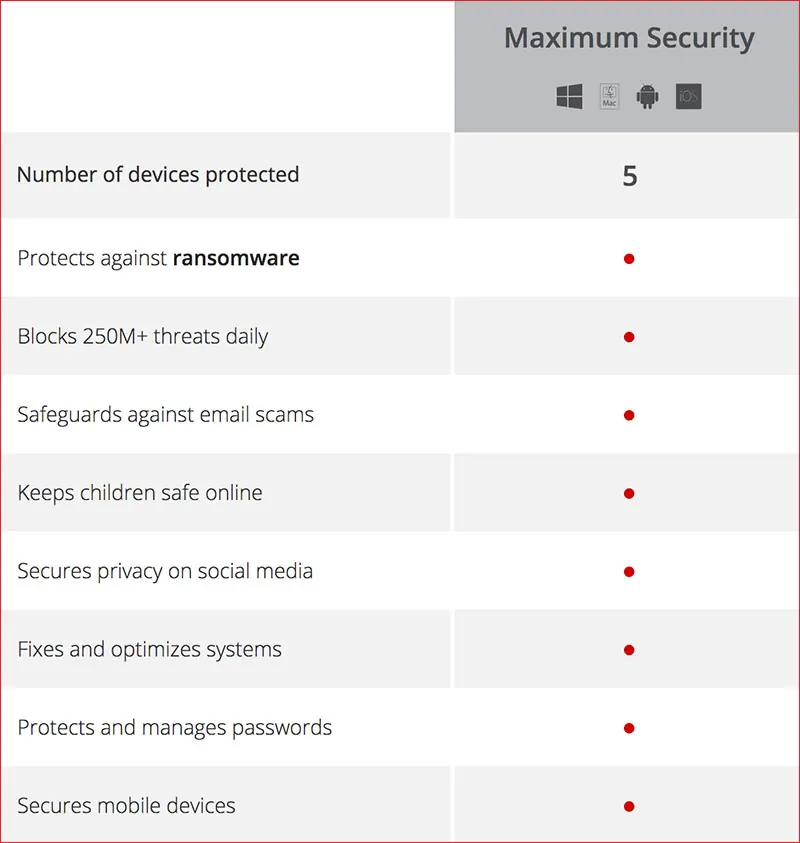
Trend Micro protects against ransomware and email scams, and secures mobile devices.Â
Cybersecurity is not just for desktop computers and laptops anymore. Trend Micro can ensure that all your devices are protected and that you and your family do not become the victim of ransomware.
Your kids are playing on your smart phone, aren’t they? Is it protected? What about their tablets?
Gone are the days when we only needed virus software on one family computer. Now many families likely have 5 or more devices connected to the Internet that need protection.
Trend Micro Maximum Security offers protection for up to 5 or 10 devices.

- Use strong passwords that are stored securely online.
The only way to use really strong passwords that are different for different websites is to use a secure password management service.
Trend Micro Maximum Security includes support for protecting and managing passwords.
Talk to your kids early about passwords and what makes up a strong password. Teach them to never have passwords include their names, pet’s names, birthdays etc., but also that words alone are never safe enough.
One way to teach kids to make up a good password is to base it on a phrase and include special characters, numbers and both upper and lower case letters.
- Don’t click on links.
This is a tough one… we all click on links all day long. But it’s one of the most dangerous things you can do online.
Teach your kids not to click on links in emails or ads without permission from a parent.
Be on the watch for fake news and fake urls. You need to be careful of search results, ads and other links you want to click.
Get in a habit of hovering over a link to see the url and check that it is spelled correctly and matches where you intend to go. A common trick is a slightly misspelled url.
If you want to visit a particular site mentioned in an email or ad, go to your browser and type the url in there.
It can take lots of restraint to not click on a tempting click-bait link title or follow the latest “news” story that seems incredibly shocking.
While you should talk to your kids about these dangers, most people at some point click on a bad link.
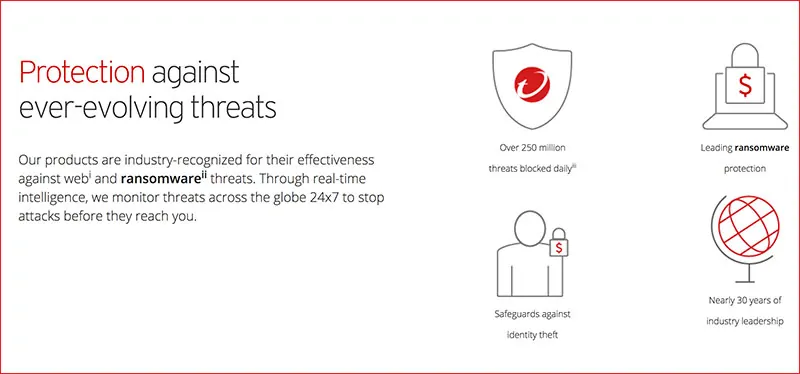
In fact, Trend Micro found that 65% of families have had their home computers infected with a virus or piece of malware. Which brings us back to #5… Use a multiple device security service such as Trend Micro.

Find out more at TrendMicro.com | Facebook.com/TrendMicro | @TrendMicro
Pin it for Later
Disclosure: This post is sponsored, so extra thanks for reading and sharing.
Written by Susan Carraretto, co-founder of 5 Minutes for Mom
Talk with me: @5minutesformom and Facebook.com/5minutesformom
Pin with me at pinterest.com/5minutesformom





great article, I was very impressed about it, wish you would have stayed next share
Your opinion is good, I will refer to it
I like how well it protects.
I like that it covers 5 devices
I like that it protects against internet and email phishing scams.
I love that it will cover 5 different devices!
I love you can use it on multiple devices and protects against email scams.
I like that it can protect 5 devices, my whole family could be protected.
Though Trend Micro doesn’t have an integrated firewall, it’s not really needed since Windows already has that! Trend Micro Internet Security (2017) includes antivirus, anti-spam, and parental control, along with tons of bonus features that actively help to keep my devices secure! I suppose if I had to pick JUST ONE feature that I like most it would be the anti-ransomware, as that is becoming a huge threat in the cyber community!
I LOVE THAT IT PROTECTS AGAINST SCAMS.
I like that it protects from ransomeware.
My favourite feature is that it protects you against email scams.
I love that it safeguards against email scams
Trend Micro protects against ransomware and email scams..,
The password protection is a great feature! Thanks so much for the chances to win.
I like that it protects against email scams.
Everyone in the house has so many devices, that I most like it covers 5 of them!
I like that it has password protection.
I just love that it is safe and easy to use.
I love that it protects you from ransomware on multiple computers.
I like that it helps keep kids safe online and protects multiple devices!
It protects your passwords & also protects from ransomeware
I like that it keeps kids safe online.
I love the password protection!
I like that it protects against ransomware and other things and also that it protects multiple devices.
I like that it keeps children safe online
I like that it keeps kids save online.
I like that it protects against ransomware.
The feature I like best is that it can be used on multiple devices. We have our desktop computer protected, but not our tablets. Would love to have the extra security for us and our kids on all of our devices!!
I like that it secures privacy on social media.
I am in IT and I love that it blocks ransomware and from millions of threats! So many viruses out there to mess up your computer or even slow it down and this prevents it!
Keeps you safe from email scams.
I love the protection from email scams.
I like that it protects against ransomware…thank you!
I like that it protects against so many different threats.
I like that it protects and manages passwords.
The feature that I like the best is the SMS text messaging that posts in a private Facebook group.
I love that it manages passwords. I am terrible at remembering them and my husband has been telling to find something to store them in.
I like that it protects against scam emails.
I like that it guards against email scam
I like that it protects against ransomware
I like it protects passwords
I like that it can secure mobile devices.
I like that it protects 5 to 10 devices, including mobile devices, and that it protects children online. This has so many great features that other programs don’t have, so why would you use anything else? They have thought of everything.
I like that it covers 5 different devices and protects against ransomware.
security and safety
Love the password protection. That is so important
I like that Trend Micro Maximum Security offers protection for up to 5 or 10 devices, including tablets and smartphones!
I like that you can use it to ensure that all of your devices including your smart phones and tablets are protected.
What many of us are looking for is a comprehensive multi faceted service. Which can simplify protection for our family. It’s hard to do that with multiple devices and different types of protection from numerous threats. Great job addressing a complex issue that to the end user offers a simple solution.
The password protection!
Secures privacy on social media
i like that it will protect me from ransomware. i think this sounds awesome.
Password protect and mobile devices.
I like the fact that it safeguards against identity theft.
I appreciate the protection against ransomwear it offers.
Besides the obvious protection I like the protection and management of passwords. I now have so many passwords and PINS and access numbers for so many different things it gets so confusing.
Password protection.
I love that it protects against ransom wear plus I can use it on 5 different devices.
I like the fact that it covers up to 5 devices.
I like that it fixes and optimizes systems, and that you can use it on 5 devices.
I like that it optimizes my system.
I like that it’s easy to install & it would bog my computer down!
email scams for sure
I love that it can protect all of my devices.
Protects 5 devices!
I love that it can be used on mobile devices as well!
I like that it sage guards against email scams.
I like that it secures privacy on social media.
I love it secures privacy on social media.
I love that it safeguards against identity theft.
The password protection is my choice
I like that it safeguards against email scams
Helps protect me from e-mail scams!
I like that it protects 5 and can catch ransomware
The password protection
I like that it safeguards from email scams. I get a ton of spam emails and this feature would help me tremendously!
I like that it can protect up to 10 devices!
I like that it helps with email spam.
I love that it keeps kids safe online!
I like that it protects your passwords.
Like that it covers 5 devices – all the kids tablets- & protects against things like ransomware
I like that it secures your privacy on social media.
I like the protects and manages passwords feature the best.
I like that it protects against Ransomware. RW seems to becoming more and more common. Scary stuff!
My favorite feature is the malware protection.
I like that it protects your passwords
I like that it’s password protected.
I like that it protects & manages passwords.
I like that it helps to manage passwords.
I need to use stronger passwords thanks!
Ransomware protection
I like that it helps to keep kids safer online. The password manager is an interesting idea too…just hope they don’t get hacked!
I like how it protects multiple devices.
I like that it secure mobile devices.
I like that it helps keep my kids safe while they’re online
I like that it has parental control, it would be very helpful for my daughter
I like that it protects all the devices so everyone is covered!
I like that it can protect multiple devices!
I like that it will protect up to 5 devices!
I like that it covers 5 devices.
Protects against scam emails!!!! Love it!
I like that Trend Micro protects up to 5 devices!
i like that it covers multiple devices
I like that It does not slow down the computer and that it is easy to understand and install
My favorite feature would be that it protects from ransom ware and also that this can be used on 5 devices.
I like that it’ll secure my mobile device. (:
I like that it protects against ransomware.
that it keeps kids save online.
1st priority family . All posted way helpful.
I like the included support for protecting and managing passwords. This is critical for maintaining privacy and security!
I Love that it protects 5 devices!
I like that it protects against ransomware.
I like that it covers 5 devices
We had trend micro years ago and really liked it. We later switched to another due to cost. I would love to go back to it. My favorite feature is that it covers 5 devices.
I really like the fact that it protects against Ransomware. They are the worse because they put a virus on your computer and them want you to pay money to them to take it off. Glad protection against that is offered.
I love the password protection.
I am impressed that you get protection for 5 devices; that seems like more devices that other packages. I also appreciate the greater security for social media. Its incredible how little security social media has. Facebook has added lots of privacy features but Instagram hasn’t and I worry about my niece using Instagram all the time.
I like that it safeguards against scam emails.
It is easy to use loving it
I like the protection from ransomeware.
I am asking myself why I don’t already have this. i like that it secures passwords for me, protects against email scams, which I get more than I can count on a daily basis. I also like that it protects 5 computers.
My favourite feature is that it protects you against email scams.
I love how complexly it protects security online
I like that it cam be used on multiple devices!
Keeping my family safe of coarse and managing and safeguarding passwords is the best feature.
My favorite feature is that it protects against Ransomeware!
I love that it protects up to five devices. I also like that it protects against randomware.
I like that it protects against ransomware
I like that Trend Micro Maximum Security offers protection for up to 5 or 10 devices.
I like that it protects your passwords and protects against ransomware.
Multiple device protection!
I like that it keeps children safe online and that it protects from daily threats!
I like that it secures privacy for social media accounts
Trend Micro has always been a great product for my electronics safety.. I’ve used them before and love them still!!
i like that it keeps kids safe online.
I like the child safety aspect.
it covers 5 devices
My fave tip is to use strong passwords – we all know we should but I’m guilty of using easy to remmrber sometimes!
I like it secures mobile devices.
I like that it protects passwords and safe guards social media
I LoVE that Trend Micro also secures mobile devices! All of our phones are linked to the computers so this is stellar!!
I’m liking that it protects mobile devices. That’s an important thing!
I love the password protection and that it protects against ransomware.
Protects against ransomware.
Thanks for posting this giveaway!
i like virus protection
I like that it can ensure my privacy on social media! I have multiple social media sites and that would make me feel more secure.
I like that it protects up to 5 computers as we have several in the home.
I like that it can do 5 devices at once
I like that it secures privacy on social media. I use social media only rarely, and try to keep it as anonymous as possible but there are way too many ways for information to get out to be complacent.
The password protection feature is my favorite because I feel that it is very important.
It Protects and manages passwords. there are way too many.
I like that it secures mobile devices.
I like that trend micro also secures mobile devices.
I like that it’s easy to use. Anything that helps with keeping kids safe. Number 2 was the best. Privacy online doesn’t exist.
i like that i can use it with up to 5 devices
I like its feature to block scams emails.
I like that it protects against email scams. Good thing indeed.
My favorite feature is that it safeguards against email scams.
Ransomeware is something that I know very little about so that would be very useful. Besos Sarah.
The most important thing about Trend Micro is that it helps you protect your children online.
I really like that it protects against ransomware.
It protects and manages passwords.
I really like that it blocks 250M+ threats daily and secures mobile devices too.
I love that it can help keep my children safe online.
I like that it protects against ransom ware.
I like that it’s not mcafee
I love that it protects and manages passwords. That seem to be a big issue to be careful about nowadays.
I like that it covers 5 devices so that my family can be protected
I like that it manage and protect password.
I like that it protects from ransomware and protects my children while they’re online.
Thank you for the giveaway. I love that it protects the system from ransomware and helps fix system issues.
I like that it protects against ransomware. I’ve been attacked before and almost lost all my pictures.
What I like most is that that it blocks 250M threats daily !!!
The feature that I like the best from Trend Micro is the Anti-Malware & Advanced Threat Protection.
The feature I like most is keeping kids safe online
It protects against ransomware.
Protection from Ransomware
I most like that it protects your passwords.
I like that it protects ransomware.
I like the fact that it protects passwords.
Really love the password protection
protects against ransomware
That it protects passwords.
Ransomware is nasty. I am glad that it helps protect from it.
I like that it protects you from Ransomware and is able to stop any threats before they even reach you.
It does not slow the computer down and is easy to use.
I like the ScanMail Suite for Microsoft Exchange
I like that it includes support for protecting and managing passwords. That is something I forget about.
I like that Trend Micro protects against ransomware and email scams. I sure get enough email scams every day!
I like that it can keep kids safe online
I like that it will keep my kids safe online
I definitely like that it keeps kids safe online
I like that it protects you from ransomware most.
secures privacy on social networks
I love that it offers password protection.
I like the fact that it can be shared with 5 computers, and does not slow the computers down like some.
Trend Micro protects against ransomware and doesnt slow down your computer
The feature that I like the best from Trend Micro is the ransomware protection.I like to be assured of the security of all our devices. Thanks so much for this amazing oportunity! 🙂
My favorite feature is that it covers so many devices, we each have one in our house!
Being the mother of 3 from 16 to 1 years of age, I love that this provides the max security for up to 5 devices so I don’t have to worry about which device they are using!
I like how it protects against ransomware & protects up to 5 devices. Ransomware is so frightening & it would be such a relief to know my devices are totally secure.
I really like how it keeps online safe for the kids. Thanks!
I like that it secures mobile devices.
i like that it protects against ransomware.
the password protection is great
They are all great but I really like the ransomware protection. We are very concerned about the security of all our devices. Thanks for the super giveaway opportunity.
I like the ransomware protection.
I like that it protects against ransomware.
I like the “keeping children safe feature”
I like how it protects you from ransom ware and email scams because they are serious threats
I like that it protects you stuff from the dreaded ransomeware!
I like that it protects children and passwords.
I am so scared of getting hacked so I would love a service like Trend Micro to keep my computer and phone protected. Thanks for this awesome giveaway opportunity!
I like this feature: blocks 250m+ threats daily
I like that I can add up to 5 devices, it’s needed because all the kids have their phones as well as I do.
I’m impressed it protects 5 mobile devices!
I like that it covers mobile devices as well as computers.
I like that it protects all devices such as smartphones and not only computers!
I like that it protects against Ransomware. Very scary!
I tend to get email-scammed a lots, so I like that it gives protection against that!
subscribe email: slehan at myway dot com
I like that it protects from ransomware (my current software doesn’t)
Thanks for the contest.
Trend Micro…sounds like a new player in the anti malware segment. I may give it a look.
I like that it secures mobile devices.
i like it protects passwords that i just fine is something that i need
I like how it protects against ransomware
I love that it protects your passwords.
i like how it offers protection for up to 5 or 10 devices.
I like that this secures mobile devices.
I like that it covers up to 5 devices at once and won’t crash my computer.
What a great product! I like how it protects you against ransomware. I’ve had family members who have fallen for those scams. Everyone needs this on the computers and mobile devices!
I like how it protects and manages the passwords. This is a biggie for me.
I like that it blocks 250+ million threats daily!
I like that it protects your smartphone. Never gave much thought to needing protection for mine.
with 5 grand kids here daily I like that it protectes 5 devices and Keeps children safe online
Password security
I love that it protects passwords and that it is easy to use without slowing down my computer!
I would love to win a $200.00 Amazon gift card! Please choose me.
1 I like it because its from Trend which I have used because I know they are good. 2 I like that they are constantly evolving because its seems there is a new threat daily.
I like it protects against ransomware and secures mobile devices.
the child safety is my favourite feature by far
keeps kids safe online
I LIKE THAT IT KEEPS CHILDREN SAFE ONLINE 🙂
Nice that it will cover 5 devices and will do its best to protect with identity theft.
protects passwords and works on five devices. I love that. I so need this for all my devices.
I like that it protects against ransomware and that it covers 5 devices.
I like that it manages all the passwords. I always have too many and forget.
Excellent idea to teach kids not to click on links- I didn’t think of that!
I like the password protection feature
I like that it would manage and protect my passwords.
I like that it also secures mobile devices.
I like that it protects Smartphones and Tablets also
I like that it helps with scam email which I get a lot of.
What I like most is that it protects against ransomware.
I like that is helps manage your passwords. Such a pain with all the various security requirements out there!
I like that it secures my privacy on social media
My favorite feature is that it safeguards against identity theft!
I like that it protects from ransomware – extremely frustrating when malware gets a hold of your electronics and it can be difficult to remove.
It protects against ransomware – best feature!
i like that it protects against the threat of Ransomeware.
I like that it can be used for 5 devices. I am always worried about attacks on our phones and tablets.
It keeps children safe and covers 5 devices
blocks against threats
The password security is my favorite feature.
Protect against ransomeware, email scams.
i like that it protects and manages passwords
It secures your privacy on social media
I like the blocks 250M+ threats daily feature best.
thank you
I talk to me kids almost every day so a feature I love is that it keeps kids safe when on line.
I like that it blocks over 250 million threats a day.
I really like that it’s for 5 devices so you can have one membership for the house and all be able to share it. Very handy and affordable!
I like it protects kids and you can protect up to 5 debices
i love that it blocks so many threats
Password protection!
One of the great features is that the Trend Micro Maximum Security offers protection for up to 5 or 10 devices
I like that it protects your passwords.
I like that it protects passwords, safe guards against scam emails
I like that it protects against ransomeware and also protects my mobile devices
I love that it covers 5 devices my current security software only covers 3.
I like that it covers 5 devices
I like that it protects against Ransomware.
I like that it protects against ransomware
Will it help with my insecurities? jk LOL
My favorite feature is protection from ransomware.
I like that it guards against email scams get so sick of receiving them.
i love that it protects against ransomware. its a much needed feature!
I liked that it protects up to 5 devices.
I like that it protects multiple devices.
I like that it secures privacy on social media and that it covers 5 devices. Thank you!
I love that it safeguards against email scams.
I like that it covers 5 devices, and protects from email scams.
I love that it can help optimize the system.
My youngest is getting older and is in the computer more and more. I like all the safety features for children. I also like that it blocks spam – so much out there! Thanks for the chance!
Great ideas! Thank you for sharing!
I love that it secures everything! Even mobiles!
the fact that that it blocks internet threats i need that because Imon the internet most if the day
I like that it covers 5 devices, is easy to install, and would help keep my kids safe online.
I love how kids are protected !
The family protection to keep kids safe
pass word protection
I like the Privacy Settings feature on TrendMicro; I don’t like to be tracked online. Plus, I would not like my neighbours being able to access what I am doing (its shocking how easy that is to do).
The best feature is that it protects against nasty ransomeware!
I like that it protects your kids against threats – cyber bullying and children being taken advantage of online is all too common these days, sadly. It’s nice to see a program that focuses on the protect of kids.
I like that it protects against ransomware.
It can be used on multiple devices and looks easy to use
I like that it manages (and protects) passwords, because im the worst at forgetting them lol i also really like that it protects up to five devices!
I like that it’s easy to use and install cause heaven knows I need that.
I like that Trend Micro Maximum Security can be used on multiple devices.
I love that it protects and manages passwords. I stink at remembering my passwords.
Protects against email scams! At this point it’s not a threat because I know what to look for: it’s just plain annoying.
I like that it secures mobile devices – because those are the ones our family uses most often, and hard to monitor!
I need a good protection for our family’s computers. My favorite feature is the password protection and anti-scam software.
Protects against ransomware!
I like that it protects your passwords.
I like that it protects me from ransomware without causing my computer to lag.
I like how they safe guard against e mail threats and also protects children surfing online
safeguards against e-mail scams
I like that you can use it on up to 5 devices and not just computers.
I really like that it offer protection for multiple devices. It’s easy to forget how important it is to make sure our cell phones are important as well!
I like that it blocks spam
it protects against ransomware
I love that it keeps kids safe online and also offers password protection!
The password protection, easy installation.. and easy to use.
I like that it protects your info
I like that it protects against ransomwear
I like that it protects against ransomware.
The feature that I like best is that is has safeguards against email scams.
I like that it has parental control, so you can control of what your children are looking at online.
I’ve used it for over four years. I like that it is easy to use and protects against viruses, ransomware, and email scams.
i like that it doesnt slow the devices down.
I love that it protects against email scams and viruses. I have a hard time distinguishing a virus vs a safe email.
I like that it protects multiple devices. So many programs are only able to register one device.
I love the ransomware protection and the fact that it doesn’t slow you down like other programs!
I like that Trend Micro Maximum Security offers protection for up to 5 or 10 devices
I love that Trend Micro Maximum Security includes support for protecting passwords.
I like that it protects against ransomware and protects my passwords.
that it secures mobile devices
I like that it fixes and optimizes systems
I like that it protects against email scams.
I like how it covers 5 devices.
I like the safeguards about email scams – I know how careful you have to be, I don’t know what I would do if I got a virus on my laptop!
I love that it helps makes the kids safe online
I like that this protects you from against ransomware and email scams!
I like that it protects against ransomware
Wow, tough choice! I love that it protects against Ransomware.
I like that it has protection against phishing.
I like that it doesn’t slow down your computer.
The most important feature to me, is that it will keep my children safe online
I really like that it protects from ransomware. Even the big companies are getting caught out by that.
i like that it covers up to 5 devices
My favorite feature is that it protects against ransomware.
I love that it will protect five devices.
I like that you can use it on up to five devices and it keeps kids safe online.
I really like that it secures mobile devices.
I like that it protects against Ransomware.
It protects against ransom ware that’s one of my major concerns
I really appreciate that it has leading ransomware protection
I like that it won’t slow your computer down.
The password protection feature.
I love that it works on up to 5 devices! This is a great resource for protecting kids online.
Thanks for the chance to win!
wildorchid985 at gmail dot com
I like that it safeguards against email scams.
I like that it keeps kids safe online when browsing
I like that it safeguards against identity theft!
I like that it safeguards against e-mail scams.
I love that it secures mobile devices:)
I love that it protects against ransomware.
I like that it protects from ransomware….that is scary now a days.
I love that it manages my passwords!
I like that it keeps Social Media secure.
I really like the protection and yet privacy features on this item.
I like that it protects against ransomware.
The ransomware protection
I like the password protection feature. Great article.
I like that it protects passwords, safe guards against scam emails (love this), social media as well.
I like that it protects your passwords.
I like that it protects against Ransomware!
I like that it protects against ransomware!
I like that is protects against ransomware and spam.
I like that it protects against ransomware and protects and manages passwords.
I love that it protects your passwords!
Protects against ransomware
The feature I like the best from Trend Micro is it fixes and optimizes systems.
Protects and manages passwords. It can get frustrating with so many different accounts to log in to.
I like that it secures privacy on social media.
I love that it is good for other devinces, not just PCs. We use several tablets and phones.
I like that it protects against ransomware which is emerging as a growing threat these days.
I like the number of devices protected best.
I like that it protects and manages passwords.
I like that it protects against ransomware!
My favorite feature is the ransomware protection. 🙂 Thank you.
I love the password protection. These days hackers are cracking everything.
I like that Trend Micro secures privacy on social media.
Mostly I like that it protects from Ransomware. This is most important to me.
my number one favorite feature is being able to protect us from internet scams
Aside from keeping my kids safe, which of course is my biggest concern, I like that it fixes and optimizes systems. I need that in my life!!
I like that Trend Micro offers protection against ransomware and email scams, and secures mobile devices.
I like it protects against ransomware and secures mobile devices.
It protects you from Ransomware
I like the protection against ransomware.
I like that it helps keep my kids safe while they’re online. Thanks for the giveaway!
My favorite part is that is keep my kids safe online
I like that it protects against email scams. I always see them in my spam folder.
I like that it covers 5 devices
I like that it protects you from Ransomware
Love password protection.
I like that it protects your passwords.
I like the protection and yet privacy features on this item.
I like that it protects against ransomware and that it covers 5 devices.
I like that it keeps kids save online.
It does not slow the computer down and is easy to understand and use. t is easy to install
I like that it protects passwords, safe guards against scam emails (love this), social media as well. I like that it’s for 5 computers.