
I have no scientific data to prove it, but I’d bet that in a list of most popular New Year’s Resolutions, “Getting Organized” would rank pretty close to “Losing Weight”. It certainly did on my list.
Is getting more organized one of your goals for 2009?
A huge goal of mine this year is to more effectively manage my projects and keep my task list more organized. And I’m excited because I’m already well on my way.
As a work-at-home mom with two online stores, a network of blogs, and two new exciting websites in the works, it’s clear that I need some effective software to organize and manage my business, my family and my life.
But in my previous life as a software developer in the business consulting world, I spent far too much time updating Microsoft Project schedules. And I miss MS Project about as much as I miss the inhumane overcrowding of the morning commuter trains.
I’m an entrepreneur. I like to see new opportunities and create exciting projects. Sure, those projects need to be ‘managed’, but I don’t want my whole day spent dirty in the depths of MS Project.
It’s been six years since I rode a commuter train and I haven’t opened an MS Project file since.
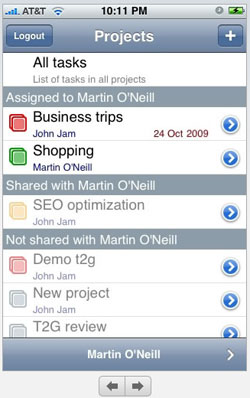 No, I need a mobile, quick and easy, Web 2.0 app that I and my ever-growing team of work-at-home moms can launch on whatever desktop, laptop or iPhone we have with us at the moment.
As a work-at-home mom, I’m constantly juggling between my desktop, laptop and iPhone, so I need my tasks stored online.
And I can’t force my team members to struggle with the complexities of MS Project or another similar monster application.
So when I heard of an iPhone compatible application called Task2Gather, I was intrigued. It’s a free online service for task and project management that requires no training.
I soon discovered Task2Gather is perfect for me as a mom as well as a business woman.
With Task2Gather I can manage work projects as well as create personal tasks for my shopping lists, household chores and family responsibilities. I can share and assign tasks to teammates and to my dear hubby — those who don’t have iPhones simply use the web-based version.
After I hopped over to the iPhone app store and for 99 cents downloaded it, I started adding tasks.
It is dead easy to use.
On my iPhone, I immediately began creating projects with tasks and subtasks. I then went to the website and signed in to the full online version. I easily invited new participants to my projects, and assigned them to tasks.
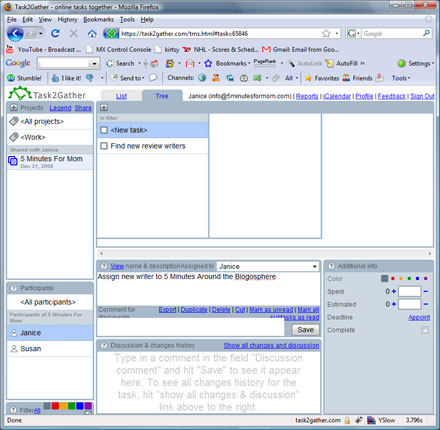
My team and I are thrilled and thankful to have discovered Task2Gather. It’s simple, yet powerful. And, it’s basically free.
The iPhone download is currently only $0.99 and the basic online application is free to use. I believe they will soon also offer a paid subscription with advanced features such as reporting, attaching files and more.
Since Task2Gather is a new application that is perfect for moms and business women, the developers asked us to get your feedback. So, for a chance to win $200 cash, you can sign up for FREE at Task2Gather and test it out.
Then come back here and leave us a comment telling us what you like and what improvements you’d suggest.
If you have an iPhone, you’ll love that you can download the iPhone app for only $0.99 and manage your tasks on the go. (Testing the iPhone application is not required to enter the contest. The only requirement for entering the contest is that you test out the free online version.)
I think after your test run, you’ll agree that whatever your business, if you’re a mom, your life can be simplified with Task2Gather.
Remember, to enter to win, test out Task2Gather and leave your feedback in a comment below.
If you already subscribe to our newsletter and/or our RSS feed and/or have our button on your site, you qualify for additional entries. Also, if you tweet or spread the word via facebook, your blog, etc., just leave additional comments letting us know and you will have additional entries. (Your comments are your entries.)
This giveaway is open for entry until Friday January 30th, 2009. The winner will be announced on Saturday January 31st, 2009. This giveaway is open to US and Canadian addresses.
Please see our site’s Terms and Conditions of Use for a complete list of our Contest and Giveaway Rules. This promotion is void where prohibited.




I signed up for your newsletter.
I subscribed to your feed.
I found Task2Gather very easy to use and liked the various features it offers. I can’t think of any suggestions for improvements.
I dont like it much either. I have microsoft Works and it has a planner on it. You cen set up reminder on it. I like it better. I would probably like it more if I played around on it some more. but I have way to many things to transfer from one to the other. But is a good idea
Too confusing.
I did not like it.
Love it, do they have a task 2 gather for a laptop as well since i use my laptop EVERYWHERE?
Thank you for this opportunity!
It’s fast and easy, but you can use Outlook just as simply without having to download.
newsletter subscriber!
feed subscriber!
it is a bit confusing, especially for someone like me who has no idea what i’m doing most of the time. It would be cool to have a video tutorial, those are always super helpful, watching someone else do it always helps!
However, if i ever did learn how to use it, it looks like just the kind of thing i need, i can never stay on track with time management and this looks like it would help me out!
I see a lot of uses for it. I think with a little more time, I would be able to see myself using it a lot more.
I have your button on my blog
http://auntiethesis.blogspot.com/
I subscribe via google reader
Like some of the other posters, I had trouble figuring it out. I wish there was an online video instruction manual. I still have no clue how to add participants and I must be missing it.
I like that you can change the colors and assign tasks by participant. I saw there is an email function and I’d love that. I use AOL calendar now for appointments and I always email myself a reminder for doctor’s appointments or functions at my daughter’s school. That’s an invaluable tool for me and it would be great to also email reminders to my husband.
I love it
count me in
It’s pretty simple and easy to use but I’m on the go a lot and I don’t have an iphone so that part isn’t usable for me. I’m not sure I would like having to go back to the computer so frequently although once it is in place it might be less bothersome.
great prize.
I don’t know I think it is just easier to write a list.
I could use some extra cash.
Very cool. Maybe have a flash demo or something at the beginning. Its pretty intuitive after looking at the screen but it was a little confusing at first.
Organization reduces stress which is often my biggest trigger in weight gain.
awesome organization tool!
Sure could use this prize, I’m a organized person still trying to get family to be.
Thank you
I could get so organized with $200. Look out Container store here I come.
Get organized? That really sounds stressful.
I also get the newsletter. Thanks!
Subscribe to the feed
It’s pretty cool but I have an organizer on my phone which is a little less confusing. It is a good concept though. I think with some changes it can be awesome.
I don’t have an Iphone, but when I get one
I will try this out.
Tweeted you too!
http://twitter.com/ardy22
id love this and my mom too
Great to help organize!
count me in
subscriber
thats really not up my alley but i checked it out like i was supposed to
i hope i win
It appears to be a great organizational tool for busy lives, but I’m retired so I think I’ll just stick to my To Do Lists. They’ve worked for decades, and I don’t care to change my ways.
I do like the CONCEPT very much but, like some others, I do not find this product to be user-friendly. Perhaps that’s because, as a grandma, I did not grow up with high-tech gear and am somewhat intimidated by new electronics, but frankly I find the screen to be very “busy” in appearance and therefore uninviting to use. I also have a concern about “accessibility” of text size and color contrast for users with lower vision. I would like to see this product modified so that a wider range of users (especially older people) would find it appealing. Also, my dears, just as an aside: I think if I had enough on my “to do” plate to actually need this I would head back to bed and pull up the covers!
Still can not figure out what you are. Registered and then hit a dead end. So if I need to spend 10 minute getting into the site I am not up for it.
It sure would help out wityh my heating bill. Thanks for the contest!
sounds great!
I would pay some of my dental bills
I like how it installs on your phone so it can go along with you!
This is a huge time saver! Thank you so much for turning me onto this program! Here’s to my new organized life!
I would help my dad pay some of his medical bills.
I subscribe to your newsletter using the email I listed in the comment form.
I subscribe to your RSS Feed on Google Reader as one6ylady too.
I follow you on Twitter as one6ylady
Blogged/Tweeted the giveaway here http://twitter.com/one6ylady/status/1129890263
I played around with it a bit, and can see how well the system would work if I had calendar tracking on Outlook and possible something other than a TracPhone (pay as you go phone). Unfortunately, it’s of little use to someone without the proper phone and integration capability. Now I want an iPhone or a PDA so I can transfre data there and use the program. Darn it..
subscribed.
mommy2skie@yahoo.com
this is a pretty cool app. but a little more complicated than i would like at this time. thank you for the opp.
mommy2skie@yahoo.com
I am a subscriber.
tamben7996(at)aol(dot)com
It is a great system but the draw back is I do not have iPhone. It is very organized system and really can be a helpful tool.
tamben7996(at)aol(dot)com
would love to win and thanks for the opportunity!!!
i subscribe as well!!
would love to win and thanks for the opportunity!!! AS a therapist who works out of my home I can see 1000 uses for this!!!!
The program sounds like an interesting way to help families stay organized.
Cheers
Kathy
I’d like a little more structure or perhaps “hints” on how to use the program, but other than that I’m happy with my purchase….. More colors would be nice too! 🙂
I Tweeted about the giveaway :
http://twitter.com/LuckyLadybug/status/1112456867
I blogged about the giveaway :
http://luckyladybug.wordpress.com/bloggy-giveaways/
Your blog and button are in my blogroll :
http://luckyladybug.wordpress.com/blogroll/
I subscribe to your feed in Google Reader 🙂
I like that there’s a Windows Mobile client I can use on my HTC SmartPhone. I don’t have to wait to get back to my home computer to stay organized, and I can easily share “honey-do” lists 🙂 I also like the color coding. I’d like to see a Firefox sidebar add-on developed for a quick view of projects – similar to the phone apps. *Thanks* for the giveaway!
Get your newsletter too.
I subscribe.
I didn’t feel it would be useful for me. I love to carry around my to do lists and tasks because I’m always on my feet with four kids. Also, I like having a wall calendar for everyone to look at as we’re walking in and out of the house and it’s right by our telephone too. In addition, I don’t use my cell phone for anything but emergencies. Guess I’m not that technically savvy. Thanks for the giveaway.
This is very user friendly and seems like a helpful tool.
I am Subscriber
I blogged about this on my Fantastic Friday blog giveaway listing at:
http://sarahspeakssavvysahmreviews.blogspot.com/2009/01/fantastic-friday_09.html
I get your newsletter.
I subscribe to your feed
I feel really stupid. I am going to continue playing with it for a while but I can’t seem to figure out how to work it?
I think that when you sign up there should be a video to tell me what to do….or the part I am just not getting. It confused me.
Please sign me up.
I subscribe to your newsletter!
I subscribe to your feed!
Overall, it seems to be a great idea! I work in an office part of the week and from home part of the week, and it’s a great way to access my running task list and information wherever I am.
A few things that I would like to see improved: the faded gray instructions in the boxes are so faded that they’re hard to read. I also wish you could subtasks that are actually called “subtasks” to tasks: adding them as “comment for discussion” just doesn’t make intuitive sense to my brain. I think the comments and the subtasks should be two separate things, with dates easily assigned to the subtasks.
I would also like to be able to set up a recurring task at intervals.
Also, it would be great if it were possible to create a larger project grouping (a category?) and then move already created projects and their accompanying notes, etc. into it without having to retype everything in as new tasks. In general, I wish it were easier to move things around for filing purposes; drag-and-drop would be nice.
I am a subscriber to the blog.
I am a subscriber to the newsletter.
I have your button on my blog.
I got the application on my Iphone. I thought it was easy enough to add tasks, but I would have liked a small tutorial when I first added the application. Most applications you add to your Iphone do that. I would have liked to know that I could add tasks, but to further make use of the application I needed to go to the online version. I also would have liked to be able to do a lot of that work on my Iphone versus online. I also think it would be nice to be able to add a comment to the task in a separate box.
I do think I will use this though. It will be most helpful to me if I can get my husband to use it too so that I can assign him tasks ;).
Great organizational tool – I could really use it 🙂
I like this! I have two feedbacks. One is, maybe show some things it does on the site before you register (if this was on there, I couldnt find it) and a little more description on how to use it. It took me a while to figure out what to do! Besides that, its wonderful!
kayceewilliams @ gmail.com
I am a subscriber!!
I am a subscriber.
hmm… wish Blackberry had something like this :S
Thanks for this chance.
Thank you for introducing me to Task2Gather. What a cool tool to help
me get organized. Best of all, it’s simple enough for anyone to use.
Thanks for the contest. Best wishes for a happy and prosperous 2009!
I think it’s a great idea, but just not for someone like me. I prefer my notepad that I can carry with me. Now if someone would just get me an iphone then I’m sure I would love it!
I am very happy with the online calendar I already use, it emails me reminders for all of my appointments at the time/date I select. I looked at Task2Gather and it is not something that would work well for me.
It was a little too complicated for me.
I subscribe to your RSS feed via Yahoo reader.
I liked it! It was pretty easy to use and helpful also.
Thank you!!
It seems ok. I wish there was a tutorial so I could see what I could REALLY do with the application!
I am a subscriber:0)
I really like it:0) any help I can get to be more organized is always helpful…
more giveaways, although $200 is quite nice, thanks!
Getting better organized is my New Years resolution
Great!
I subscribe to your feed.
I subscribe to your newsletter.
I am going to try to get organized with this!! WOuld love to win!
Looks great. I could use all the help I can get to get organized.
I subscribe to your RSS feed.
I am an email newsletter subscriber.
I would love a good organizational system that works online & on my iPhone. Unfortunately I wasn’t crazy about this one. Here are my thoughts after playing with it a bit:
* I would prefer they not send my password in an email when I set up my account. It’s unnecessary and insecure.
* I would prefer keyboard shortcuts (i.e., for creating projects, tasks). Clicking the tiny + sign button for each task is a little cumbersome for those of us who prefer keyboard over mouse.
* I expected to be able to edit , , etc. inline, instead of having to select then edit in a separate field. Also, the “Save” button on this name/description field is located in a confusing place, since I may not always be adding a “Comment for discussion” on each project/task.
* I expected the ? icon to take me to help. It didn’t do anything (at least in my browser).
* Is there a way to put a project’s tasks in order (default order appears to be alphabetical)? If one task needs to be done first, I would like to list it at the top.
Sharing tasks with others sounds useful — but unless/until the app itself has a better user interface, I don’t think I’ll bother my husband to try it out with me.
Of course, the reports, cost analysis, etc. lead me to believe I’m not the intended audience. I want to track home & small business tasks, and it seems like this is geared more towards a corporate environment. For someone with those needs, the extra features might make the clunky interface worthwhile.
Thanks for the giveaway!
i really like this and will use it. i am always making lists and trying to organise things…well this way i know i won’t lose the lists!
I am trying to get your newsletter subscription!
I subscribe to your feed.
I have your button in my sidebar.
It seems a lot like rememberthemilk.com, but better. I like it and I think I would enjoy all the features for awhile. But, it would get old. I like to write things down on a piece of paper so that it can get lost! 🙂
I’ve got your button!
I get your newsletter!
I’m a subscriber! Thanks!
I signed up and I don’t know if I’m just slower than everyone else but I’m not really getting it. Maybe I’m just not organized enough. 😉 Or maybe it’s just really late and I’ve had a long day. Anyway, I am going to check it out more tomorrow when I’m fresh but until then I hope it’s okay to enter because otherwise I’ll probably forget. Thank you girls for having these great giveaways!
I’m a subscriber 🙂
It’s a great idea, but I’m more a “wall calendar” kinda gal 🙂
I love this–I think it would be really useful for some college group projects I need to do this term. I can see how it would benefit families as well.
I don’t do mobile computing so I’m not crazy about having to sign into my home comp every time I wanna add or look up something on my list.
I am trying it right now and i like the concept of it, i think it just takes some time to get used to. Thanks for the chance to win!
I like my own calendar – thanks
newsletter subber
rss subber-email
I guess I need to really sit down with it, wasn’t bad and I forwarded the link to a few to look at
I do get your emails, please continue to keep me on your list. Thank you
I like my calendar, this takes too much time. A pen and paper is quicker and I have my list posted on the frig so I look at it when I go to make lunches.
It’s ok but it has too many features that I wouldn’t use, something more basic (ie. a sticky note program for my desktop) is fine with me
I think it was a little to complicated for me. I can’t spend that much time to make a list. Maybe a short manual would help.
I am also a subscriber.
altheima AT hotmail DOT com
Im a subscriber.
I found it to be a little complicated. I am old school though. Im sure it would be great for some people though. Maybe if I had an iPhone.
At first glance, it seems like it would be very useful. It was really easy to register, but beyond that, the interface isn’t the most user-friendly. It was a little hard to figure out what to do, how to edit different projects, etc. As a graphic designer who works on projects with other designers occasionally, it looks like it has potential to be very useful for me, but it’s going to take some figuring out. I wish there was a tutorial to walk you through all the steps of using it.
the link option not very user friendly
I wish it was alittle more user friendly out of the boc.
subscriber
I signed up & it seems like a great program. I couldn’t think of any big projects I have going on to really test it out with. I see great potential in the site though!
I registered and looked at it, but didn’t think it was for me. I am a paper person.
I really love this idea. I did register, however I do not have an Iphone. I did look in detail at the whole concept and I really love this idea of how organized it is. I love that it has subcatagories. This is really a wonderful idea for a busy working parent. Thanks so much for introducing this idea to us and thanks for this contest.
I think its great!,dont have an iphone though.
I agree, a tutorial may be helpful, but it is pretty simple to figure out 🙂
I tweeted:
http://twitter.com/carogonza/status/1100203529
I subscribe
I liked it but I find that it’s not as easy to navigate as I thought it would be. I have a plam and I use it with my Outlook and it is a lot easier. ALthough if you needed to schedule stuff and didn’t have a plam or iphone or balckberry, this is pretty good.
Looks good. Like the link option. I like my palm pilot too but can’t set different beeps for importance
Your button is on my blog.
I am a subscriber.
I think that it is a well-done program, but in general, I have trouble with online calendars and organizers. It is a good program, but of course it still requires us to actually USE IT. Therein lies my problem.
My husband has an IPhone. I will ask him to try out the version on his phone and see if he likes. it.
I subscribed 😀
Seems easy enuff. Not sure if its for me tho
This is a really cool app! And couldn’t have come along at a better time : )
I’m in! Thanks for a great giveaway!
MUCH appreciated!
I really liked this! It was very easy for me to understand and be able to set up my tasks. I might have to forward this to my mom and let her know about it.
orchestratenoise0726[at]yahoo[dot]com
A tutorial would be nice. I am having a hard time getting it to work but it may be because my brain is fried from having the kids home for christmas vacation. When I click on calender it wants you to copy and paste the link which is a little silly. I don’t know if it is some thing I would use everyday since I don’t have a iphone and can only use it when chained to the computer.
love this program – wish you didn’t have to have constant web access to utilize it – maybe google gears?
thanks!
I sub to your feed and follow your tweets 🙂
This looks like it could be useful to me with a couple of tweeks…
1 – It would be more useful if it integrated with google calendar
2 – I would have more use for it if I were able to schedule recurring events – weekly sports practice/games for my dd, tutoring sessions, carpool info, etc.
I’ll continue to play around with it a bit more.
Thanks 🙂
I follow you and tweeted the contest @tlpounds
I’m a subscriber.
traceys[at]suddenlink[dot]net
The app seems nice. I think it would be handier for people w/ iPhones so they could see their info at any time. Great needy application in our busy lives!
Thanks.
traceys[at]suddenlink[dot]net
I don’t have an iphone and couldn’t get the site to work. I’m sure its something simply that I am missing.
Hate to say it, but even though I’m a computer nerd kind of person, I prefer writing everything on a wall calendar.
I signed up, so far so good. Only one drawback for me is I have virgin mobile as a cell phone provider so I cannot download the app to my phone, I also cannot access the site via my web browser on my cell phone. 🙁
However I do like the function and plan on using it on my computer, as I am a stay at home homeschool, going to school myself mom, I can use it at home all day.
I also am a subscriber and have tweeted this app and facebooked it.
I like some things about it – especially that you can tag your projects to help organize them, and share or assign them to others. I wish it integrated automatically into a calendar – I want to be able to see my tasks on a calendar format easily on the same site. I also wish you could put in a range of dates instead of jut a single date deadline. I like tracking my giveaways, and they run for days to weeks at a time. This is something that Google Calendar does well. All in all it does look useful, but not exactly what I’m looking for.
I have your button
I think it is great to help me get organized. Good for appointments and to do lists. I think it would help a lot.
And I have your button – playhereoften.com
I also subscribe to the newsletter.
I am a subscriber via feedreader.
I like it. I could see it being very useful with a couple of teenagers and a husband to keep track of. Maybe I just missed it, but if you could email the reminders and calendars directly to your participants that would be nice.
I am a subscriber. Thanks for a great giveaway 🙂
Hi, I’ll take the cash or both.
I liked it, I welcome ideas to become better organized.
My house desparately needs to be organized. Beteen 6 grandchildren and all of my craft items, I am hopelessly stuck in termoil
i am a subscriber too
it seemed ok but i’d like a big button or easy link at the top to add a new project. I couldn’t figure out how initially
I would love to be more organized and the $200 would be nice too.
I didn’t like it either. It was unnecessarily complicated to just save a task.
So far so good. It will need some practice [doesn’t everything] and I like the idea that you can assign different tasks to different people.
With a bit of luck I’ll be able to delegate everything to everyone else so that I can become a true lady of leisure.
As soon as I can figure out how to do it I shall download it to my i-phone.
I do think it could do with an additional feature though, something like a cattle prod light electric shock to force me to take action.
Cheers
Well how could I resist such an offer. I’ll be back later [probably much later] after I’ve down loaded and practiced.
Cheers
I’m a subscriber.
Thanks for the offer. I tried it for a short while. It is okay probably better for someone with a more complex life. I will stick with my calendar in Office. Thank you
Wishing the calendar function would work seamlessly with google calendar or that events once placed in Task2Gather would then appear or could be imported to calendar database!
To be able to pull up timed/dated tasks within a weekly agenda would be very helpful;
i have your button up
i am subscribed to your newsletter
i am subscribed to your feed
i liked it but it’s a little to much for me. i loke my simple wall calendar. would help if i had a i phone or something.
Got it!! WhoooHOOO and loving it!
Already created a LONG list of to do and sub-folders for the kids and their to do lists, plus the firehouse hubby to do and reminders…. I’ll be back with any suggestions pros/cons as I use it more. So far ease of use to be sure! Now i’m wishing I had an Iphone too!! Take it with me!
very cool – I want one!!
Your button is gladly on my sidebar!
PS I know Lori (up there) -and I know that with all her doc appointments she’d be lost without it! Her and her Iphone and apps are inseperable!!! 🙂
I am a subscriber (alwaysalways(at)ymail.com)
In the meantime I have twitter’d:
http://twitter.com/AlwaysAlways/status/1098100619
(I’ve actually heard about this app from other friends who have Iphones and they love it and swear by it!)
Can’t get to the site at this time – keep erroring on me! grrrrrrr think there are a bunch of folks hitting the weblink all at once.
Will try again shortly!
I subscribe to the feed!
I’m a subscriber!
Very Cool!!
Ok. Apparently I am a moron. I did not find this easy to use. I couldn’t change the names of anything so it was all “New Project” and “New Task”. I tried to send in a feedback form to ask for help and even that wouldn’t go thru. Maybe their site is having issues at this time? I might try it once more when I have more time but I may not even bother.
I’m a subscriber
I also have your button on my blog.
I’m also a subscriber.
I really like the comments/discussion box so I can post my progress and/or have others post their progress.
When I open the page I’d rather see it default to all projects and have the tree already expanded. This way I immediately would see at a glance what I have to do.
Overall, I’m glad you’ve pointed this out to me!
Your button is on my blog!
I am a subscriber.
Review of Task2Gather
Pros:
Easy set up of projects
Can export to iPhone (although I don’t have one)
Can have multiple users
(Minor) Cons:
Has a few *code bugs* that cause text boxes to overlap text – specifically when the window is not fully expanded the phrase “comment for discussion” wraps under the text box.
When I click on calendar, rather than it taking me to my calendar it prompts me to use a link and cut and paste it to get there from other applications. When I paste in a new window I’m told “wrong login or password” on a blank page.
Overall, I’d say this is a great program – FABULOUS for a free one! Not sure how much I’ll really utilize it at this point as most of my day is dictated by my 4 month old’s schedule rather than mine – but it is nice to have a centralized location I can log into for a To-Do list.
Thanks for the tip on this program!
I registered and played around with it but not sure if it is something I would continue to use. It was very simple to get started. Thanks for the great giveaway! ~ 🙂
JeansandTs@hotmail.com
I didn’t like it for me. Not that it is not a good product, but because I am such a simple person that this is actualy more complicated than my life is. I’ll stick to a wall calendar.
I like it, I love it, but can I do it??? Maybe after I win my Geek Godess book!
Kirtsied! First try…hope I did it right! [tempest1952]
dlcwin AT gmail DOT com
Twittered the contest:
http://twitter.com/tempest1952/status/1097703183
dlcwin AT gmail DOT com
I subscribe to your feed.
dlcwin AT gmail DOT com
I am an email subscriber.
dlcwin AT gmail DOT com
Who wouldn’t love to get organized! I can see that this program as it is would be useful to me, and do away with my current system of jotting things on pieces of paper that I promptly lose track of, but think it unlikely that I would opt for the paid subscription even with extra features as it would just not be worth it to me at this time.
Great to see new programs coming available and still free to the public!
dlcwin AT gmail DOT com
I would love to be organized and also reach my goal weight.
I downloaded and it should be able to be used with other phones besides IPhones.
My helper indeed! I could use some better organizing! Life with 3 teens and a hubby is BUSY!
Love the prize!
I also subscribe to your newsletter
I tweeted!
Your button is on my blog
I am a subscriber
It’s interesting and I can see a TON of uses for it! I think with a little more time, I would be able to see myself using it daily and becoming quite dependent on it. I love anything that helps me get organized!
I liked it — it’s very simple…. The best part about it for me is that certain tasks can be shared with certain people. Perfect for me since I have separate schedules for my kids and all their activities, my administrative work and my blaph/blog work.
I subscribe as well. Thanks!
I tried this, but I’m going to stick with my Google calendar and google tasks. The Google software meets the needs of my husband and I. I did like Task2Gather, but I don’t have an iPhone so that part doesn’t interest me and it is much easier for me to stick to a calendar, email and task list that are all integrated and viewable on one screen.
I have been searching for a free, online “to-do” list…and this service is great! I loaded in my to-do list for today – I love that I can add sub-steps to my main items, and editing is a breeze.
My only gripe is that I wish it would integrate with the calendaring application I use (Google Calendar), or at least show up as a widget on my Google homepage. if they could add a widget feature, making this easily accessible without going to the actual webpage every time I want to access the list, that would make this perfect. 🙂
count me in
I twittered about this as well (user name jodimichelle)
I subscribe to the blog also
I just registered – and I like it. I think a small tutorial would be nice although once you play around with it – it is self explanatory. I’m one who likes to learn by doing and I’m a fast learner. I don’t have a ton of constructive criticism yet seeing as how I just started using it but I don’t know that this would replace my list making else where. Could end up being cumbersome to always head back to the computer, I don’t have an iPhone, to update my list. We’ll see. The jury is still out for me. But on first glance, it’s nice.
Mom24,
Susan here… I’m sorry you didn’t like it… of course you do not have to like it to be entered in the contest, but it would help the developers if you could tell us more about what you didn’t like.
I blabbermouthed it over at facebook!!
I have your button
I am a suscriber
I love it, with all of the doctor appointments that I currently have it easy for my husband to track and remember those as well as my mommy, both of them have it as well. Being as sick as I am I can be very forgetful. So when I get the next doc appointment when I check out i immedialty put it my phone, one so I wont forget and two so everyone will remember so they can make plans on who goes with me to those appointments
I subscribe.
I have your button.
I did not like it, I hope I can still win the money. : )