
Before I got my laptop and all I had was a desktop computer, I was quite picky about the kind of mouse that I had. I started out with just the kind that you could click on the left or the right. Then I was introduced to the mouse that had the wheel in the middle which made scrolling a page so much easier. At that point, I thought I had reached the pinnacle of computer mouses.
Then I got my laptop which had the touch mouse and I never wanted to go back to the old way of scrolling again. That was until we were recently contacted by Microsoft to do a review and giveaway of their newest innovation — The Touch Mouse.
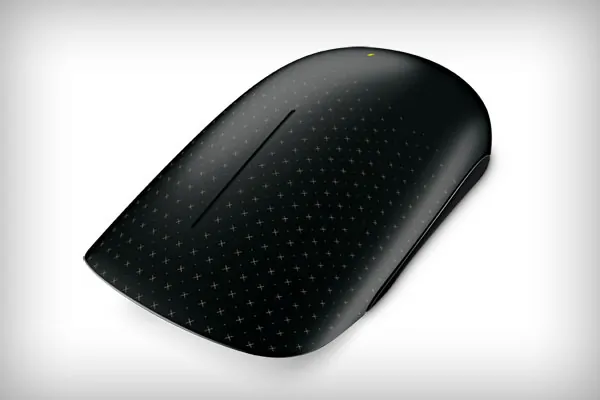
It’s sleek
It’s stylish
It does so much more than any other mouse on the market!
At first glance, you probably would be like me and think it was just a left click/right click type mouse. It’s so much more! In fact, the Touch Mouse is a combination of all three types I described above.
About the Touch Mouse
Touch Mouse features a large touch-sensitive surface that responds to one, two, and three-fingered movements that are optimized for window management: snapping, moving, minimizing and maximizing, going backwards and forwards on your webpage, swinging between tasks, and so on. Its contoured shape fits comfortably in your hand, and with built-in BlueTrack Technology you can to use it virtually anywhere. Touch Mouse is easy to learn and fun to use, but you can still point and click as you would with your old mouse while getting comfortable with the Touch gestures.
The Touch Mouse makes your Windows 7 experience so much better! it sells for $79.95 and can be purchased at any office supply store or online at Microsoft.
Key Features
There are some key features to the Touch Mouse that make it different and unique. You can choose to use one, two, or three fingers when scrolling and clicking.
- One Finger: Scroll, flick, or pan any direction for quick navigation. Sweep your thumb to go forward or back.
- Two Fingers: Snap to see your windows side by side, or maximize and minimize.
- Three Fingers: Show all open windows or reveal your desktop.
-
Exclusively for Windows 7: Touch Mouse takes advantage of the enhanced features of Windows 7 to make you more productive.
Watch this video to learn more about the Touch Mouse
Enter to Win
2 readers will be chosen to get their very own Touch Mouse! To enter the giveaway, leave a comment here letting us know what you think your favorite part of this mouse will be.
The giveaway will end on January 26th and a winner will be chosen by random.org and announced in our weekly Around the Blogosphere post.





that it’s wireless – one less thing my toddler can grab!~
My favorite feature is it is wireless.
I love that you can use the shortcuts of one, two, or three fingers, but you can also just point and click like an old style mouse until you get used to the shortcuts.
My favorite part is the three fingers
best part for me will be the multi touch
“easy to learn”
Thanks for the contest.
I like that you can minimize and maximize with it.
I love that it’s wireless!!!
I think the touch sensitive surface would be great
I use a trackball mouse right now, which makes it easier to cruise with the mouse. I can only imagine how much easier and more simple it would be to have a touch re-active mouse. This would be an amazing win. Crossing my fingers!
i love that it responds to one-, two- and three-fingered movements
I think that besides it being wireless, I would like how it can be used different ways according to how I want to use it.
The whole wireless thing
mightynaynay(at)cs.com
I love that I don’t have to worry about a cord when I am moving around and all I have to do is move my thumb. Awesome.
My hands get tired of the mouse if I’m doing something on the computer that takes awhile, so my favorite feature is being able to switch it up and swipe a thumb to get something done.
Like the way it looks.
I like that it’s wireless
wireless! love it and thanks
cant beat the wireless for sure.
wireless and windows 7 compatible, what else would I need, just wonderful, especially with my athritis
fit and wireless!
ardelong2(at)gmail(dot)com
Great for @ home or the office, like the great design of it.
I like the feature that you just snap to see side by side windows. Plus that it enhances Windows 7 should be a good thing too.
This would be perfect for my laptop, I like the 1 2 or 3 functions that it has.
I like that it is wireless.
that its wireless
amy16323(at)gmail(dot)com
I just love the fact that it is wireless! I am SO tired of my mouse cord getting tangled up and wedged in at the back of the desk!
Wireless!
I love that it is wireless I hate cords and wires
Wow, I would say that you can use it on different surfaces because of the Blue Touch technology.
Well first off it is wireless! No more tangle. and I like the sleek look.
kat_emerick@yahoo.com
My fave thing is that it’s wireless but it seems amazing in all other aspects too! I am a computer fanatic so this will get a lot of love!
I think the best part would be watching my friends try to use it. They are not computer smart so it would be so funny.
Love that this mouse work with the Windows 7 features. Also like the thumb control.
My favorite part isthat it’s wireless
My old style mouse is dinosaur.
The Three Fingers: Show all open windows or reveal your desktop is what I like most about this mouse
I like that you can choose to use one, two, or three fingers when scrolling and clicking and it works with Windows 7.
I like that its wireless the best.
The touch sensitivity is cool.
I like that it goes with Windows 7.
I like it’s that it’s wireless and that it looks very easy to use! Also the design is very stylish!
i think the mouse would be easy to use and comfortable on the hand.
I like the fact that it goes into low power mode until you touch it, saving the battery and extending the time between changing them.
Thank you for the chance. I think my favorite part would not having a scrolling ball or wheel to mess with. My fingers are getting bad so this would be perfect.
I like the Blue Touch technology allowing you to use it on practically any surface
I love that it is wireless I am so sick of cords everywhere…
I love that it’s contour shape shape fits comfortably in your hand.
I think my favorite feature is the way this mouse interacts with windows 7! Aside from that, being that i’m left handed, being able to switch my buttons as needed is important 😉
I love that it’s wireless. I have used a wired mouse with my laptop and sometimes it’s just not easy or convenient to use because the space available is limited.
My favorite part is that is wireless.
i like the one two three finger option
can i say everything? : )
i love the look though. its very modern.
I love the idea of sweeping your thumb to move forward or back. Pretty cool!
I would love the touch sensitive feature of the mouse and it’s one click finger technology
i dont have a mouse right now and i need one. I think that all the different features will really be neat. Good luck everyone!
Exclusively for Windows 7
I think I would love the ease of switching screens. The Two Fingers: Snap to see your windows side by side, or maximize and minimize (sounds like a feature I’d use a lot)
It’s ergonomic design is what I like best!!
i think the best part will my finger not going numb from the vibrations in my scroll wheel
I like that it doesn’t take as much space to use it and you have the option of using 1-3 fingers
I like that it fits comfortably in your hand
I like the ergonomic design since I have problems and I love the touch scroll feature. So much easier to use.
I love the sleek look.
I really like all the techniques you can use with your fingers. So much quicker and easier than with a regular mouse.
Love the 3 Finger Feature! erinnsluka@gmail
i like the Touch Mouse takes advantage of the enhanced features of Windows 7 to make you more productive
The touch scroll would be my favorite thing about this Great Mouse!
I like the sleek design!
bblanto4@hotmail.com
probably the 1 or 2 finger scroll. that sounds so neat and so much better than my current mouse!
I LOVE the design (black is my favorite color) and it seems to make navigation easy which is a priority when I shop for a new mouse as I use a programs that work best with mouses that give me more freedom
the overall ergonomic design, look and feel would be my favorite
ardy22 AT earthlink.net
I really like the look of it.
A mouse is my number one nemesis. This one looks like it will fit my hand well and perform as needed. Thanks
the built in blue track technology
the shape
vmkids3 at msn dot com
I love that it adjusts to your palm
I love that it is so well fitted to your hand and that it is wireless!
I love the ergonomic design!
I like the thumb function for forward or back but the ergonomic design would probably be my favorite aspect of this mouse.
chrisdeglen(at)gmail(dot)com
I like that it’s wireless, no cords!
I like that I can use it all over the house!
deb55106{at}gmail{dot}com
my favorite part would be the look 🙂
the touch scroll technology
I love the sweep your thumb to go forward or back feature.
The improved Windows 7 experience
Will make me more productive since I can ope several windows at once
finally an ergonamic and great-looking mouse!!
The touch scroll is superb!!
The Scrolling feature. My problem with traditional scrolling features is eventually it gets old or sticky and no longer scrolls! That definitely won’t be a problem with this mouse.
Love the Touch scroll technology. I’m not getting what they mean by 1 2 or 3 finger controll. My mouse use is either right or left clicking. But I love new tech gadgets and would love to try it out.
I like that its wireless and can be used from anywhere, and not get tangled in all the cords behind your computer.
It’s ergonomic design is what I like best!!
I think it’s awesome that it can recognize how many fingers you’re using! That makes life so much easier!
Thanks for this great giveaway! 😀
My favorite feature is the built-in BlueTrack Technology. Thanks so much for the fantastic giveaway!
Renee Walters
Bored2quickly@hotmail.com
Love the built in blue track technology 🙂
I think the contour design and the touch scroll is my favorite part of the mouse.
i love that it will fit comfortable in your hand
My favorite feature is the built-in BlueTrack Technology.
alittlepieceofheaven777(at)yahoo(dot)com
I really like the look of it.
I like that you have the choice to use one, two, or three fingers when scrolling and clicking. Love this! Thank you for this great giveaway. 🙂 Jeanne
this looks sweet
I like this mouse takes advantage of the Windows 7 features.
Thanks for the chance!
the easy scrolling web pages would be so nice
This sounds cool: Three Fingers: Show all open windows or reveal your desktop.
I love that it is wireless
I love how it has multiple finger scroll.
I like that this mouse takes advantage of the Windows 7 features
I think my favourite part of the mouse will be -One Finger: Scroll, flick, or pan any direction for quick navigation. Sweep your thumb to go forward or back.
My favorite feature of this mouse is the one, two, or three fingers feature. It’s so innovative! Thanks!
I love the Three Fingers: Show all open windows or reveal your desktop feature. This mouse is “too cool!”.
Thanks
I like the three fingers show all open windows or reveal your desktop option
smchester at gmail dot com
I like the three fingers feature to show all open windows. Thanks!
I love this idea. My favorite thing about this is that it will respond like the touchscreens I’m now used to using. You wouldn’t believe how many times I try to tap my laptop to no avail!
The special features for windows 7
This mouse looks so neat, I need a new one for the laptop that I got for x-mas too.
My favorite part will be the Three Fingers (Show all open windows or reveal your desktop) option.
amybrown16 (at) insightbb (dot) com
My favorite feature is that the Touch Mouse takes advantage of the enhanced features of Windows 7 to make you more productive.
I WANT IT !
I like the zoom features and the sleek design. Thanks for the giveaway!
I like the sleek look and design, the way its curved, it looks awesome =)
Being able to sweep your thumb to move things! That will be interesting!
I like that its made to work with Windows 7! Such a cool design!
In the video there was one scene where they were sliding two fingers toward and away from each other, similar to the motion used to zoom in on a image if using a tablet PC. I can see this becoming a standard feature on all computer mice in the future once applications are developed to utilize the feature.
BTW, Blue Track technology is the best. I will not buy a mouse without it cuz it works on any surface. I once was in a situation where the mouse I using (with red light) did not track on a table surface I was using and had to go out and buy a mouse pad to use it. I have never had to pull out my mouse pad since going to a Microsoft 3500 mouse with Blue Track.
i like the Blue Track technology.
The best thing is that it is wireless.
Two Fingers: Snap to see your windows side by side, or maximize and minimize.
That would be my favorite feature. My mouse is really plain jane compared to this one. Wow!
i like the 3 fingers show all open windows feature
nannypanpan at gmail.com
to move forward or backwards
I want to win this because my mouse is dying.
I like that it is made to work with windows7
the multiple finger tasks looks cool. thanks for the chance
the enhanced windows 7 features
I think the large mouse pad and touch sensing ability would help with the cramping I get in my hand after being online for long periods of time.
With two fingers you can quickly see your windows side by side on the screen!
I think this would be my favorite: Two Fingers: Snap to see your windows side by side, or maximize and minimize.
I like the one finger scroll!!!!
I think the integration with windows 7 features will be really cool.
Wow! really neat looking, Looks light weight also, like that.
i like three and two finger features. they will really speed up computer using. it will took some time to get use to it but it will significantly improve mouse usage.
I like the enhanced windows 7 features.
Thanks for the chance.
mogrill12@gmail.com
I think what I would love the most is how easy scrolling web pages will be. Thanks 🙂
Show all open windows or reveal your desktop with 3 fingers.
I like the multiple finger tasks. I like that it enhances the Window 7 features.
I would love to tell my husband I got a cool gadget before he did. Even though he will probably “borrow” it from me if I win!!
I like that you can use it virtually anywhere
I like that this mouse takes advantage of the Windows 7 features.
abfantom at yahoo dot com
Three Fingers: Show all open windows or reveal your desktop. Great!
The versatility of this new touch mouse will be awesome!!!
I think this would be my favorite: Two Fingers: Snap to see your windows side by side, or maximize and minimize.
My favorite feature is that I can use the mouse to move forward or backwards.
that it can work on any surface means I can use my laptop anywhere
The option to use one finger, two fingers, or three fingers. Cool option and it looks nice too.
I really love the design!
I love the touch options, maybe we can go into options and change which finger sequence does.
I’d like to scroll using any finger
The 3 finger touch sounds very hi-tech
I would have to say the 3 finger touch
The One Finger features sound awesome!
can work on any surface
I like the fact that it works on any surface.
being able to do things alot faster and more advanced. love the look.
I like the Two Fingers” Snap to see your windows side by side, or maximize and minimize”
tnxns09 at gmail dot com
I love Windows 7 and I would really like to have a mouse that works interactively with it!!
Sounds much easier to use!
I think the scrolling/panning and the two finger function will make my work with AutoCAD and Power Simulation programs much easier.
I like the style of the mouse!
My favorite part of this mouse will be the fun things you can do with your fingers. Thanks for the giveaway!
being able to use my thumb to back and forward
I like the fact that it’s so easy to navigate.
I honestly don’t know if i would like this or not but i would love to try it. Looks interesting!
No mouseball or mousepad???? <3<3<3
I definitely love that it works great on any surface without a mousepad, which would come in handy since the desks in my home office and work office are made of glass!
the window snap… i love that ill be able to have my windows side by side
dollhousecreation(at)gmail(dot)com
I like that it helps enhance the features of Windows 7!
I love the sleek desgin and how easy and simple it is to use.
I like all features especially the fact it will work on any surface
I like that it’s made specifically for Windows 7.
I like the fact that you will be able to see all your open windows at once.
I’d love to be able to see 2 windows open side by side.
nrdunningATgmailDOTcom
I love the look of it and it’s many features also. It’s so much to choose from! It’s great!
I love that it takes advantage of the enhanced features of Windows 7!
the 3 finger option
brittneydejajason at gmail dot com
I think my favorite will be the multiple finger movement commands, like a touch screen phone.
Wow great flexability, I would love to have this mouse
I would like the easier scrolling
3 finger option looks super cool..
The best part of this is the overall sensory input potential of this thing. It seems delightfully intuitive.
Please feel free to contact me at – allrightyes at gmail dot com
I love that only three different finger combinations can make it work! Great!!
It would be a breeze to use, I love the 1-2-3 finger functions!
How very cool! I love that it just takes a swipe of your fingers to use this mouse and that it works on any surface. This sounds like it would be so easy to use – not to mention it’s cute and stylish!
Three Fingers: Show all open windows or reveal your desktop — how cool! In need of some advanced tech love in my life . . .
Love that it can work on any surface even carpet.
I like being able to chose how many fingers and can decide to use to control the click and scroll.
I think being able to use my thumb to back and forward
I like all the features but really like the fact you can perform most of the actions by quick motions of your finger(s)
Neat looking mouse, I like the sleek design of it.
I think the three-finger option to show all windows or the desktop would be very useful and time-saving.
I like the 1-2-3 fingers option
The one, two and three finger touch motions sounds very cool and new. I’d like to try that.
cool, i’d like to be able to sweep back and forth!
thepryfamily@gmail.com
I like the one, two and three finger functions!
I’ve never seen a mouse that responds to finger movements. (Maybe I’m just behind the times.)
I have bad arthritis in my hands and my mouse has been driving me nuts/painful!!! and I’m suppose to be starting a work at home job so I will be at the desk a lot more and was looking for something new.This will be great
It’s exclusively for Windows 7.
I like that it scrolls easily
I like the touch features, especially the One Finger touch.
Thanks so much.
That it makes scrolling faster and easier
kport207 at gmail dot com
Very neat technology and easy use too.
I like that I can use it anywhere because of the built-in BlueTrack Technology
retirenavalflyer(at)gmail.com
I love that you can scroll easier.
pokergrl8 at gmail.com
Exclusively for Windows 7: Touch Mouse takes advantage of the enhanced features of Windows 7 to make you more productive is my favorite feature!
mysteri_015 at yahoo dot com
I think the Three Fingers because you can show all your windows. And I always have multiple windows open Im going back and forth through. LOL queen of multi tasking in real life and online!
I’d like being able to quickly see windows side-by-side!
someluckydog at gmail dot com
Looks like it may be more comparable to using a tablet screen, so easier conversion going between the two.
twittered thouch mouse
No more strolling wheel… a dream come true!
I have a lot of trouble with scrolling on my laptop – this sounds like it could be made a lot easier!
cheatingpiggies at hotmail dot com
I think the 3 fingers show all windows feature looks like the best!
I like a light weight mouse.
I love the high-tech look it has.
holliister at gmail dot com
I like the 1, 2, 3 finger options to do different things.
I like the shape. I think it would be easy on my hand to rest on.
I think the two finger snap to see your windows side by side will be my favorite feature
I think the best part is how it responds to touch. Pretty cool!
Mel4Him777{at}gmail{dot}com
I like the Exclusively for Windows 7
I love the 1-2-3 fingers option and it looks like a dream to use 🙂
the scroll sounds like it would be the handiest of all for me. You can do so much with it!
bluebelle0367(at)hotmail(dot)com
I would enjoy the sleek look for sure!
Touch Mouse is easy to learn and fun to use, but you can still point and click as you would with your old mouse while getting comfortable with the Touch gestures.
I love that you can use two fingers to put your windows side by side!
i like the built-in BlueTrack Technology
We recently moved and no longer use cable tv in our home. (Love it, don’t miss it or the large bills)
Instead we are using the internet to watch all the same stuff. This wireless mouse would make that easier.
I like the option for Three Fingers: Show all open windows or reveal your desktop!
The touch sensative surface
I love that you can use one, two, or three fingers!
I like the look of the mouse.
I like that you just have to touch the mouse with fingers to get it to work. love that it makes it more virtual.
my favorite feature would be that you only have to swipe your finger to move forward, on my mouse you have to click for every move
sarah at realtorsd.com
It’s very simple and sleek looking without a bunch of “stuff” on it.
I like the shape.
i hate the click click click of the mouse but love the internet,i also have a chronic pain condition so this mouse would certainly help!
i like you can use 1 2 o3 fingers
pkeintz@gmail.com
I would like “Exclusively for Windows 7” best ヅ *Thanks* for the giveaway!
Uses features from Windows 7
sounds like it makes scrolling faster
I really like the sleek look of the mouse! I think that’s my fave.
The ergonomic design would be my favorite part! I’m on a computer ALL day, and this looks like a GREAT mouse for that!
Anything that makes scrolling easier and more efficient would be so advantageous.
I think Three Fingers: Show all open windows or reveal your desktop sound awesome.
I loved how they showed the touch points with the camera view. Looks awesome…..can’t wait to give it a spin!