This post may contain affiliate links. Read my disclosure policy here.

Today, I made a pocket sized photo book — from start to finish, right here at home!
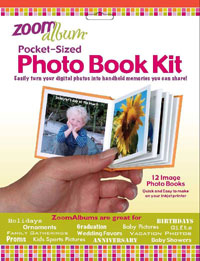 A few months ago, when I was at Startup Princess, I met Ellen from ZoomAlbums. I fell in love with her pocket sized, print at home, photo books. They were just so cute!
Ellen was kind enough to send me some to sample and today I finally made a ZoomAlbum with photos from our trip to Disney World. It was super easy and quick — although I am sure the next one I make will go so much faster now that I know what I am doing.
Making My Zoom Album
To get started making my photo book, I headed over to www.zoomalbum.com to download the software. A strange glitch on their site made the download feature not work for me. But no worries, I called their support line, and they emailed me a direct link. (I love companies who have live, telephone support!)
After I got the software working, I began creating my album. First, I selected the twelve photos I wanted in my photo book.
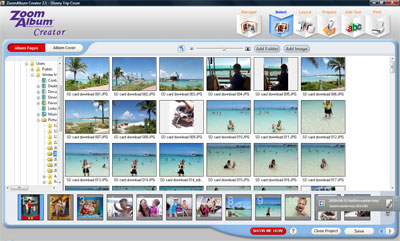
That was easy! Selecting and moving the photos is as simple as clicking and dragging.
After I selected the layout I wanted — I chose plain white borders with no frame — it was time to position my photos. Again, super easy.
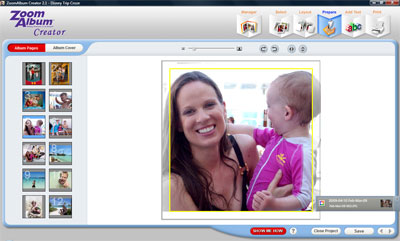
I didn’t want to add any text to my album pages, so I moved right past that step. I was ready to start printing…
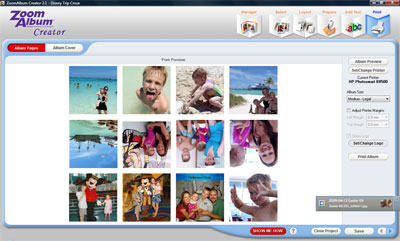
The print preview allows you to make sure everything is just as you want it. And of course there are help menus along the way for us newbies. I made sure to study up HOW to actually make this print correctly!
If you are wondering why some photos are upside down, that is because when you are finished printing, you will fold it up and ta da — a book with photos on each page.
The printing went perfectly for the album pages and I was ready to do the cover.
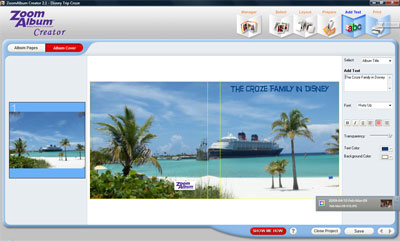
It was a bit harder to choose the perfect photo for the cover since I needed to have a shot that fit for both the back and front of the album. Once I had the photo selected, I positioned it, added a title and got ready to print.
But, printing the cover wasn’t as easy. My HP printer didn’t like the odd size. But ZoomAlbum warns us about HPs issues with their product and suggests that we tape the cover onto a legal size piece of paper and then feed it into the printer. The first time I did that it jammed, but the second time I added even more tape and it worked!
Then all I had to do was follow the very helpful instructions on the back of the photo sheets and fold up my book.
YES, it was as easy as that! And so much fun!
Here is a short YouTube video of me with my finished ZoomAlbum.
Perfect for any time of year — and especially Back to School
These handy little books are ideal any time of year. But since it is back to school time, what a perfect product to use to celebrate your summer!
A “What I Did This Summer” book for your children to take to school would be a great project to do together with your kids. Or you could make up a set of albums that cover all your summer vacations. Once you make one, I promise you won’t want to stop!
WIN a Set!
If you want to win a set of ZoomAlbum Pocket Sized Photo Books, enter to win here by leaving a comment telling us what kind of photo book you want to make first. Do you want to make one for your purse that shows off photos of your kids? Are your summer vacation photos the perfect shots? Or do you want to make a “What I Did This Summer” book for your kids?
This giveaway open to both US and Canadian shipping addresses, and is part of our 2009 Back To School Giveaway Event. Simply leave a comment on this post to enter (US and Canadian addresses) and, please, be sure to read our Back To School Giveaway rules.
As always, don’t forget to earn more entries: subscribe to our Feed, sign up for our 5M4M Newsletter, add our 5M4Giveaways button in your sidebar, write a post and link back to this contest on your blog, and spread the word via Facebook, Twitter, or email! One Tweet per giveaway, please.
Please see our site’s Terms and Conditions of Use for a complete list of our contest and giveaway rules.
Written by 5 Minutes for Mom co-founder, Janice


Alyson says
I would like to mkae several. We have our new ddaughter so I have tons of cute pictures of her, plus our two granddaughters. But, what I will make our first one of is our daughter through her current pregnancy, showing her each month. Thanks!
Alyzabeth's Mommy
jillheller says
Newsletter Subscriber
jillheller says
Feed Subscriber
jillheller says
I'd love to make a purse sized “brag” book of my kids…sappy but true.
Erin says
These would make great gifts!
mogrill says
I would make one for my Dad for his birthday. Thanks for the chance.
[email protected]
Urailak says
I have your button on my blog's sidebar.
Urailak says
I'm on your newsletter list.
Urailak says
I subscribed to your feed.
Urailak says
I'd love to put together our summer vacation photos. Please enter me. Thanks!
kaywolter says
I need to learn this I only have one Son and I am 5 years behind…wow would also be great to give Birth Mother for gifts
Casual Friday Every Day says
Since I'm a photo nut, I'm pretty much drooling over here.
Nell
Smokeysmom says
Facebook Fan – and I posted this giveaway on Facebook:
http://www.facebook.com/posted.php?id=147991692…
[email protected]
Smokeysmom says
I follow you on Twitter as “Smokeysmom” and Tweeted this giveaway:
http://twitter.com/smokeysmom/statuses/2147483647
[email protected]
Smokeysmom says
I'm subscribed to the 5M4M Newsletter by email:)
[email protected]
Smokeysmom says
I'm subscribed to your Feed by email:)
[email protected]
Smokeysmom says
I've been promising my sister that I'd make a baby brag book for her of her first (and only) grandchild, but I haven't come across any small albums that I liked. This sounds perfect. I've never done digital scrapbooking before, but this sounds so easy. I'd love to try it out:)
[email protected]
sunnyview99 says
I tweeted: http://twitter.com/sunnyview99/status/3613176752
sunnyview99 says
I blogged: http://wut-givz.blogspot.com/2009/08/5-minutes-…
sunnyview99 says
I have your button: http://wut-givz.blogspot.com/
sunnyview99 says
I subscribe to your newsletter!
sunnyview99 says
I subscribe via reader!
sunnyview99 says
I'd like to make one that features my daughter for my purse. Thanks for the giveaway!
lilyk says
I signed up for your newsletter.
lilyk says
I subscribed to your feed.
lilyk says
Please enter me into the contest. Thanks!
kirsten says
subscriber
kirsten says
i'd like to get them to send to my in-laws
lavonnelong says
clicked the twitter link under share this and it automatically tweeted the link. http://twitter.com/lavonnelong/status/3609492737
lavonnelong says
I get an extra entry with the newsletter 🙂
lavonnelong says
I have the back to school button in my sidebar.
lavonnelong says
I subscribe to the newsletter.
lavonnelong says
I get the feed via email.
lavonnelong says
I need to make a vacation photo book.
MelaniesCrafts says
i have your button
http://melaniescrafts.blogspot.com
MelaniesCrafts says
feed subscriber
MelaniesCrafts says
newsletter subscriber
MelaniesCrafts says
I would love to make one with all my flower photos.
melanieadey at hotmail dot com
taowyn says
http://twitter.com/twinpowells/status/3607354993
member (dot) thao (at) gmail.com
taowyn says
I subscribe to email updates
member (dot) thao (at) gmail.com
taowyn says
Your button is here
http://wondertwinadventures.blogspot.com
member (dot) thao (at) gmail.com
taowyn says
These would make a great quickie granparent's gift to show the babies' progress.
member (dot) thao (at) gmail.com
Ginny says
button is up
Ginny says
get your newsletter
Ginny says
feed subscriber
Ginny says
I love these
amytucker says
Great package of books.
Robyn Popham says
I blogged about your week of giveaways http://buttercups-grotto.blogspot.com/2009/08/b…
Robyn Popham says
I have your button on my sidebar
Robyn Popham says
I earned an extra entry with today's newsletter.
Robyn Popham says
I get your newsletter
Robyn Popham says
I subscribe
Robyn Popham says
This is so cute! What a great way to get the photos off the computer and into our kids hands! Love it!
LindaKish says
email subscriber
lkish77123 at gmail dot com
LindaKish says
My daughter in law loves photography. She would probably start with a book of her and my son then move on to the dogs, then the cats, then zoo animals. She would love these.
lkish77123 at gmail dot com
chelsea says
I also subscribe to your feed
chelsea says
I receive your newsletter!
chelsea says
These look way cool I would love to win! Thanks!
Linda says
These little books look like so much fun!
rosannepm says
Get your newsletter
[email protected]
rosannepm says
Subscriber
[email protected]
rosannepm says
Love the purse feature
[email protected]
April1p says
Tweeted: http://twitter.com/April1p/statuses/3603351676
April1p says
I receive your newsletter through my yahoo email.
April1p says
I subscribe to your feed through yahoo reader.
April1p says
I would definitely make a mini book of our summer vacation at Disney. These are too cute.
peggy1116 says
tweet
http://twitter.com/velvet1116/statuses/2147483647
peggy1116 says
5M4Giveaways button
peggy1116 says
Subscribe to 5M4M Newsletter
peggy1116 says
subscribe to Feed,
peggy1116 says
I would love one that I can carry in my purse. These are so neat
Thanks
garrettsambo says
I want to make a photo book with pictures of my granddaughter for my purse.
kngmckellar says
http://kngmckellar-glorias.blogspot.com/
have your button
[email protected]
kngmckellar says
subscribe to newsletter.
[email protected]
kngmckellar says
subscribe to feed.
[email protected]
jalapenomama says
Tweet!
http://twitter.com/JalapenoMama/status/3601223184
jalapenomama says
I have your button on my blog.
http://bmontag.blogspot.com/
jalapenomama says
RSS subscriber.
jalapenomama says
I'd make a special Zoom Album of my granddaughters.
I'd take this everywhere with me to show off!
Proud Grandma!
idahomom says
I would get pictures from my sisters and make a book for my dad.
susanlanai says
I earned an extra entry with today's newsletter.”
susanlanai says
Tweeted ~ http://twitter.com/susanlanai/status/3598649381
susanlanai says
I receive your newsletter.
susanlanai says
I subscribe.
susanlanai says
A little take along book in my purse or grandma's purse sounds perfect for our first project!
osheima says
This would be a perfect thing for my daughter to take to Kindergarten!
sedman00 says
“I earned an extra entry with today's newsletter
I love 5 minutes for mom
Jenny in Ca says
looks like a fun photo product! Please enter me in the giveaway!
also,
“I earned an extra entry with today's newsletter.”
Staci says
I earned an extra entry with today's newsletter. Thanks!
Staci says
And I get your newsletter.
Staci says
I subscribe to your feed.
Staci says
I'd love to make a book of our summer for my little one. That way he could remember all the “adventures” we went on!
Lindsay says
Tweet http://twitter.com/Lstixrud/status/3592220321
Lindsay says
I get an extra comment today because I receive the newsletter!
Lindsay says
I'm an e-mail subscriber!
Lindsay says
I have your button on my blog http://colitascorner.blogspot.com/
Lindsay says
I would love to have this to make a book to carry in my purse of my hubby, my family, the pets, so i could just glance down while I'm out and be able to smile!
debralu says
I just tweeted:
http://twitter.com/debralu
debralu says
I earned an extra entry with today's newsletter.
debralu says
What a great idea! I've never seen this before & would love to win this prize. Thanks for the opportunity! 🙂
stampedwithgrace says
I earned an extra entry with today's newsletter!!
stampedwithgrace says
your button's on my blog 🙂
stampedwithgrace says
I get your newsletter!
stampedwithgrace says
subscriber 🙂
stampedwithgrace says
I would love one of my new baby to carry in my purse!
srkb says
newsletter subscriber
srkb says
feed subscriber
srkb says
I earned an extra entry with today’s newsletter
srkb says
I love this would love to win this
Adele Jones says
I subscribe to your newsletter.
Adele Jones says
I earned an extra entry with today's newsletter.
Adele Jones says
I would like to make several photo books, one of my grandson and one of my Hawaii vacation.
Ed Nemmers says
Happy End of Summer!
mverno says
family [email protected]
Heather Goldsmith says
I earned an extra entry with today's newsletter
Heather Goldsmith says
5M4G button's on sidebar
***Please delete my duplicate entry of “5M4M newletter” I got an error msg and I thought it didn't go thru. So I entered it again. Thanks 🙂 ***
Heather Goldsmith says
5M4M newsletter
Heather Goldsmith says
5M4M newsletter
Heather Goldsmith says
sub to feed
Heather Goldsmith says
I'd like to make a photo book of my daughter and her friends
zippieee says
tweet
http://twitter.com/zebastyandylan/statuses/3587…
zippieee says
I have the 5M4Giveaways button up.
zippieee says
I earned an extra entry with today's newsletter.
zippieee says
signed up for your 5M4M Newsletter.
zippieee says
feed subscriber
zippieee says
I would love one for photos of my family. My 2 year old can look at it during church to help keep her 'Busy”.
karenmed409 says
I earned an extra entry with today's newsletter.
lisacoody says
I earned an extra entry with today's newletter!!! Yeah!!!!!!
lisacoody says
This is absolutely adorable!!! I have never seen these before!!!
lifewithtlc says
earned an extra entry from today's newsletter
lifewithtlc says
blogged about all these fun giveaways!
lifewithtlc says
newsletter subscriber
lifewithtlc says
feed subscriber
lifewithtlc says
I'd love to make one of our recent vacation! Great giveaway!
facebook-1301953776 says
“I earned an extra entry with today's newsletter.”
facebook-1301953776 says
i subscribe
facebook-1301953776 says
oooo
Suz says
I have the 5 minutes for Mom button.
Suz says
I earned an extra entry with today's newsletter.
Suz says
http://crunchygreenmom.blogspot.com/2009/08/5-m…
I posted the button on my blog with a post.
Suz says
I love the purse idea. It would be so great to have one that has pictures of my kids, my stepson ad my guy and I. That would be so cute…
sweetserendiptiy says
I am a newsletter subscriber
melissa b rich at gmail dot com
sweetserendiptiy says
I'd love one of our summer vacation pics!
thanks
melissa b rich at gmail dot com
talonsmom731 says
I earned an extra entry with today's newsletter.
sweetserendiptiy says
I earned an extra entry with today's newsletter 😀
thanks!
melissa b rich at gmail dot com
talonsmom731 says
I'm a newsletter subscriber
talonsmom731 says
I would love to make a photo book filled with pictures of my son's years in school. I always take pictures the first day of school, get school pictures made and take pictures at class holiday parties.
Jennifer Hedden says
enter me
Brooke says
“I earned an extra entry with today's newsletter.”
organizingmommy says
I would just make a mini book that highlighted certain things going on around here.
jfrye says
I earned a second entry with the newsletter subscription! 🙂
knezc says
I earned an extra entry with today's newsletter
jfrye says
So cool! I'd love one of these
Ellen C. says
I got an extra entry from today's newsletter. Thanks!
trista says
omigosh! This is such a great idea! I love it! I love taking pictures of my little one and hate carrying around a photo album! Thanks for the chance to win!
autumnmymoonbean says
I would love a small one to carry around!
adorablyconfused says
“I earned an extra entry with today's newsletter.”
adorablyconfused says
I subscribe to your newsletter.
adorablyconfused says
I'd make a book with pictures of the kids for my parents.
Karen says
This is so cute. I have never seen a photo book this small. I think I would choose to make one for each grandma in our family. They love to show off pictures of my kids and this is a nice, compact way to do that. Great idea!
Sabrina Sentell says
I subscribe! 🙂
Sabrina Sentell says
Leaving a comment….this is great cause they will fit in my purse 🙂
chyk says
how cute. i would love one to give as a gift to my in-laws.
Helen says
That looks so cool. I would like to make one too. I have not seen my family in over four years. And in September my husband & I (and also my husband's parents & brothers) are finally traveling to Belarus so they can meet my family. I am looking forward to taking lots of pictures with my family and my newly acquired family and friends I have not seen in years and my almost 80-year old grandma.
Ellen C. says
I'd like to make a book about my son's first visit to Disney World. i think it would be perfect. Thanks for the chance.
Sarah at themommylogues says
What a perfect size! Those would be great Christmas gifts for Grandmas & Grandpas. I think that's maybe what I'd do.
amyfinerthings says
Your button's on my sidebar.
amyfinerthings says
I'm a subscriber.
amyfinerthings says
How fun! These would be perfect to keep my 2yo busy (and quiet!) at church. I think I'd make a “summer fun” book first.
Nancy says
How cute! And so cool that you can make these at home!
Thanks for the opportunity!
chrissyrae says
Mmmm….yummo!!! Would love to make one for son and d-i-l to celebrate their one year anniversary…married on the beach…how cool to add phrases to their gorgeous pics!!!
jessicabrammer says
Sounds like a cute idea. I would make one with all the extended family so my boys could look at it and put a face to all the “aunt….” “uncle…” etc.
crygibb says
How cute! I never saw these little books before. I think making one s for the purse would be a great gift for the grandparents, as they live out of state and dont see the kids very often. Be a great way to keep them close.
Lollipopsandlipgloss says
What fun those books are!