This post may contain affiliate links. Read my disclosure policy here.

… plus, this week you can win a copy of Adobe Photoshop Elements!
I remember the first time our family got a digital camera. For the first couple of years, the computer hard drive was just a dumping ground for an endless quantity of pictures. All with names like “img002938.jpg”. (Not exactly helpful.)
Sometimes we remembered to download pictures into folders with a name or date that was significant, but not very often. And, half a dozen years later, they still weren’t sorted out! Every time I’ve gone back to find a particular photo, it turns into a nightmarish process.
So, recently I sat down to work through the backlog of images, and organize things a bit. There are an endless stream of applications available to “help” with things like this, many of which do nothing of the sort! But, two software programs made a world of difference:

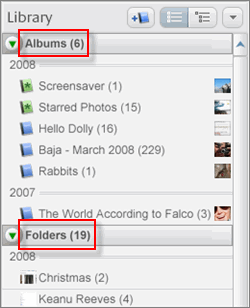 Picasa was relatively unknown photo-management program back in the old days, until they were acquired by Google. Now they’re only… slightly unknown! Truly, this program does the best job of importing, organizing, and sharing your photos, of any that I’ve ever seen.
Scrolling through images is very fast and simple, and it’s easy to manage the locations of images on your computer, as well as create “albums” of sets of related photos. Then, you can publish albums online, so friends and family can see them.
And, like almost anything Google touches, it’s all free!
Picasa is easy enough to be used by anybody, but has the power under the hood to be useful even for aspiring photographers.
Next… after your photos are sorted and organized, there’s the process of making them look good. Digital cameras of the past are notorious for under- and over-exposing photos, and I came across plenty of old pictures with image quality that just made me cringe. A bit of touch-up was definitely in order!
There’s a reason that you can find “photoshopped” in modern dictionaries. Adobe Photoshop is the “de facto” standard of image editing. However, if you’ve ever used it, you know that it can be… just a little bit complicated! As you’re getting started with photo editing, the best tool you will find is a scaled-down version designed specifically for this type of work:
Adobe has generously offered to give a free copy of Photoshop Elements to a lucky 5 Minutes For Mom visitor, so leave a comment below and you’ll be entered to win! In the meantime, check out the trial edition from their web site to get a flavor for what’s possible using this software.
My favorite new feature: We’ve all taken group photos where one person in each shot is blinking or looking away. With Photoshop Elements, you can snap a couple photos of the same group, and use the software to easily merge them together so that everybody looks their best in a single composite photo. Very cool!
My archive of photos is way improved now, with a little bit of effort. Along the way, I discovered a bunch of great shots I had forgotten about. This week, pick up some new software as motivation to keep your own photos organized!
—
Carrie B and her husband Jonathan are Oregon wedding photographers, and you can see more of their recent photos on their photography blog. She’s also a staff reviewer for 5 Minutes for Books, and operates her own book review blog as well!


Kelly from Montana says
oh man – i need to learn to use these things!
Carrie B says
It’s been one week since our post, and the contest is now closed. Congratulations to Carrie at http://www.mvlegacy.wordpress.com/ for winning the copy of Photoshop! We will follow up with you directly for your contact information.
Thanks to all who entered!
Becky says
use picasa and love it, but need a bit more and have been considering photoshop elements…would love to win! =)
mineola says
Organizing digital photos is definitely a bear!!!!! Picasa & Photoshop Elements can help tame the beast!
Shelly Nissley says
And I subscribe.
Shelly Nissley says
I have wanted to try Photoshop Elements for a long time!
Angela at contest bytes says
Button on my sidebar
Angela at contest bytes says
Subscribed to your feed
Angela at contest bytes says
I have an old old version of Photoshop and would love to get the new Elements.
Marlena U. says
I have been wanting this for a long time! Thank you SO much for the chance to win!!
Donna Holmberg says
This would come in very handy in tracking not only my personal photos, but the ones I have taken for the three volunteer groups I work with, and also those that my kids have taken and uploaded to my computer hard drive.
By the way, you have not posted anything about extra entries, but I see some people are posting them anyway, will the extra entries and duplicate posts be deleted, or are you going to amend the original post so others know you are accepting extra entries to this contest. Please post something so that those of us who actually read the rules and follow them (and also follow, subscribe, etc.) will know if we are allowed additional (APPROVED) entries. Thanks!
Selina says
Awesome giveaway! I would love to win this. Thanks for the chance. iclipalso(at)yahoo(dot)com
Terri says
newsletter subscriber
Terri says
feed subscriber
Terri says
button on sidebar
Terri says
I’ve been wanting this forever. Would love to win.
Chelsea Daigle says
I’d love to win this. Photography is great hobby of mine.
Anita says
I am also a subscriber!
Anita says
I would love to win a copy of Photoshop Elements! Count me in! 🙂
jen says
I’d love to win Elements. Thanks!
GAhome2mom says
subscriber
gahome2mom at gmail dot com
GAhome2mom says
I would like to win this program too. 🙂
gahome2mom at gmail do com
CMC says
I’m putting a new website together and could SOOO use this! Great giveaway – thanks!
Angela C. says
I’m a subscriber
accoupons at gmail dot com
Angela C. says
I would love to win a copy. Thanks for the giveaway.
accoupons at gmail dot com
Shelly T. says
I also receive the newsletter.
Shelly T. says
subscriber
Shelly T. says
Another great contest and a great product to work on photographs!
Cherie says
I LOVE Picasa! I also LOVE Photoshop and my version just crashed so I would REALLY love to win this. Puh-LEASE pick me!!!
Melissa says
Tweeted
http://twitter.com/Mel4Him/status/1817706860
Melissa says
Have all your buttons on my blogs sidebar.
Melissa says
I subscribe to your newsletter.
Melissa says
I subscribe to your feed. : )
Melissa says
Right now I use GIMP to edit my photos. But I sure would love a copy of Photoshop Elements. Wonderful giveaway. Thank you.
Barbara Ann says
Love Picassa…and I would love to have a chance to win a copy of PSE!
Boysnberries says
This has been on my dream list for awhile now. Love your site!
Susieqtpie says
Yep i’m a visitor to 5 Minutes for Photography! I am an avid budding photographer and would LOVE to have Photoshop! Great review and im going over to try it out! Thanks!
Nicci says
I would love, love, love! to get my hands on photoshop! 🙂
Sharon harvey says
I would LOVE LOVE LOVE to win this! I am a HUGE photography fan & have been dying to learn how to “Photoshop” some pics that haven’t turned out to be the great shots I thought they would be!
Thanks as always for the great giveaways!
Sharon
Lindsey says
Okay, it’s my turn to win something now! LOL This would be AWESOME, thank you for the opportunity to win!
LaVonne says
Well, I would love photoshop. I love taking pictures of my princess.
Stephanie says
I am hoping to get a DSLR for Christmas this year (PLEASE Santa!!) and having PhotoShop to go with it would be wonderful. I could practice now on the pics from my really terrible point-and-shoot. 🙂
Dawn Hudson says
I would love to win this. Though if I don’t I might just have to buy it. Please Random Picker pick me!!!
Sarah says
I’d love to be able to “play” with my photos, especially now that I’m taking better pictures!
DeeDee says
oh I so need to work on my photos. I have found myself with pics on three different computers.. LOL and then on some discs. Now I am overwhelmed.
Would love to win PhotoShop Elements…
DawnS says
I would so love to win this program! Thanks for the chance.
Mozi Esmes Mommy says
I’d love this! I can’t justify the money for Photoshop, but want to do more with my photos…
melanie says
subscribe to your newsletter
melanie says
subscribe to your feed
melanie says
i have your button
melanie says
Thank you sooooo much for the chance to win!
Charlene says
I have your button on my blog sidebar
Charlene says
I’m a subscriber
Charlene says
I have been wanting to get this, thanks for the chance to win.
Angie says
This is a great giveaway! I’m a subscriber also.
Christa says
I am subbed to your feed!
Christa says
I fell in love with Picasa after Google acquired them. The software makes handling the number of digital images a breeze.
Thanks for a great give-o-way!
Christa
Celeste says
I’m a feed subscriber.
Celeste says
Wow–fabulous!
MamáChanga says
Your button is on my blog! 🙂
MamáChanga says
Newsletter subscriber! 🙂
MamáChanga says
Feed subscriber! 🙂
MamáChanga says
I would love to win a copy of PSE! How much easier it would make organizing and editing my photographs!
Hugs & Blessings!
shannon prophitt says
This would be fabulous!! I just got a new Nikon and would love this program.
kimberly h says
Omgoodness I really need this! Please pick me!
Heidi says
Oh, I really, really need this!
Drama Queen Jenner says
I really need something like this! 🙂
Chava says
I’ve just recently started doing Photography as a side job, photoshop would be fantastic to have.
Thao says
I use Picasa and having Photoshop elements would give me the ability to enhance my photos.
member(dot)thao(At)gmail.com
Kelly says
Very cool prize. I think everyone is interested in improving their photos.
Jinii says
I love Picasa and would love to have Photoshop Elements!!!
Jessica Harwood says
Perhaps I’m too late now . . . but I would love to enter! I’m just getting started with photography and I would love a program I can do a few more things with than just Picasa!
Deb - Mom of 3 Girls says
I would love to win this – that ability to mesh group photos together to get the perfect shot would be awesome! 🙂
Vickie Bartlett says
I would love a copy of Photoshop Elements. Thanks for the giveaway
chele says
OH! This would come in sooooo handy on most of photos! =)
Jenny says
I would enter, but I already have photoshop 7.0.
Debbie B says
I have an old copy of paint shop pro, but have always wanted to learn Photoshop. There are so many tutorials and extras online that you can get for it, that you can do amazing things with Photoshop.
Jean M. says
I enjoy using Picasa as it is relatively easy to use for basic photo editing. I would love to put my big girl pants on and try Elements, specifically for designing my blog headers, something that I’ve really enjoyed doing lately.
Angie says
I would love to get PSE! I can’t afford it but I have been wanting it for YEARS! I could do so much with this, like edit and spruce up photos of the cards I make, as well as watermarks, and Digital Scrapbooking! OOH! I’m excited!!! (Can you tell?)
Veronnica W. says
I *heart* Picasa! I love that it forces you to make a folder or download them to an existing folder when you upload photos. I too had such a problem with organizing my photos! What a mess!
Paula says
I love Picasa and have used it for years. I’ve been wanting to try Photoshop Elements… Maybe this was meant to be? Thanks for the chance!
Elena says
I am actually trying Picasa right now! I’ve been wanting Photoshop Elements for a while now! Thanks for the chance to win!
Noreen says
I need a new way to organize my photos!!
Jackie says
I love Picasa, but this sounds awesome! Thanks!
Jen B says
I just started using Picasa, but I’m secretly desiring this one…shhhh…don’t tell google!
2Forgetful says
This sounds great – I’m off to try it out right now. I especially liked the sound of the group shot editing. Trying to get a family photo with two 3-year olds is so tough.
Heather says
I would have so much fun with this!!!
Staci says
I so want this! Pick me! Pick me!!
Nancye Davis says
I am always looking for ways to make my pictures better.
onemotherslove says
Oh my gosh, you’ve gone & made me lust after a giveaway! I’ve been wanting PSE for a while. I used Photoshop as a graphic designer before kids & really miss having software that I can really do stuff with.
Dena says
I would love to win this! My pictures are SOOO not organized!
nell says
I’m really enjoying picnik, picaso and polroid.net
Enter me to win, too, please. :–)
Nell
SheSnaps.com
Audrey says
I have a few thousand photos on my computer and would love to be able “fix” some of them!!! 🙂
Lori says
I too would love to win this. I have tons of photos to enhance b4 scrapbooking them this summer.
Sheila says
I have been wanting PS Elements for some time now!
Vivian Deliz says
I follow on twitter.
Dina says
Pick me 😉
Vivian Deliz says
I follow with google reader.
Vivian Deliz says
I take tons of pictures and need a tool to “improve” my photos. Thanks for the giveaway.
Amy says
I need to win this so I can photoshop my Biggest Loser finale pics. Thanks!
MaryBeth says
I receive the email newsletter.
MaryBeth says
I display the button on my sidebar.
MaryBeth says
I’m a subscriber.
MaryBeth says
Oh I would love to win a copy of Elements. I just use Picasa for storing, organizing, and editing right now, but I imagine that Elements would be a tremendous boost to my editing abilities! Thanks for the chance.
Rebecca R says
I subscribe, and this would be a great thing to win right now!! pick me please!!
Michelle Kent says
I’d so love to win Adobe Photoshop.I have at least 20,000 pictures and would love to organize.Thanks
Rachael says
Wow! This would so be wonderful to win! Please enter me in the give-a-way!!
Aimee says
Keeping my pictures organized is tough! But I do LOVE picasa! I can always find any picture on my computer! LOVE IT! It’d be great to have photo shop to go with Picasa!
Amy L says
I’m subscribed to 5M4M emails.
Amy L says
This would be so much fun to use. Thanks!
Elli says
i’ve been using picasa for a couple of year now and love it! however, i don’t have a photoshop program, so this would be perfect!
Lisa says
Love Picasa but would love to get Photoshop a whirl.
Lisa says
Oh my gosh, this would be so awesome to win!!!!
Angela says
my photos are a mess!
Stephanie says
This is just what i need for my new Canon, please please pick me 🙂
Stacy says
Oh pick me! Pick me! I just got a camera for Christmas and I definitely can use all the help I can get.
Gina says
My mom has Photoshop Elements and thinks I would love it. Hopefully I’ll win!
kate says
This is exactly what I need, I was just talking to my husband about how I need help with my mess of pictures on my computer!
Lolli says
I have been very interested in trying out Picasa…but I know already that I love elements. I had it on an old computer, but I don’t have it anymore!
Erin Lowmaster says
I could really use this program, thanks for giving it away 🙂
D Robinson says
I’ve heard this program is great…would love to win it!
Tomara Miller says
This would be wonderful to win!! Love your blog!
Rebecca says
I would love to have this. We are trying to save money be taking our own photos rather than paying a professional.
Chelsea says
I have lots of pictures the need to be sorted and taken care of….this would be great to win! Thanks!
Sue says
I have TONS of photos that need dealt with and I HATE whatever program came with my computer. Would LOVE to have the Adobe program and will have ot check out Picasa!
Thanks for the info!
Julie Ann says
I have the same problem. sort of. I dump tons of photos into folders on the computer. The kids love to watch the slideshows. But HOW do i organize and ‘touch up’ the photos to print and put in my physical albums? I went and bought a program from Creative Memories and it is confusing me. Is this Adobe photoshop easier I wonder? Is picasa easier? ~sigh~
veedee says
Photoshop Elements is exactly what I need, thanks!
Nancy S. says
I would LOVE a copy of Photoshop Elements!!! I have gotten the free trial, and LOVED it, but it’s not in our budget right now 🙁 Thanks for the opportunity to win it!
Angie says
I subscribe through Google Reader.
Angie says
I have been praying to the Photoshop fairies to leave me this edition under my pillow. So far, no luck. Crossing my fingers that I win this! Thanks!
Amanda says
Oh I have been wanting Photoshop…. I LOVE pictures!!!!
Jennifer C says
I’ve got your button!
Jennifer C says
I’m an RSS subscriber
Jennifer C says
Oy, do we need this! our pictures are a total disaster.
Kelly from Montana says
I need to learn how to use this BIG TIME! So many photos – so little time!
LT says
I love photoshop! I just wish I had more time to play with it. Thanks for the great giveaway.
Jennifer B. says
I subscribe to your newsletter also….
Jennifer B. says
Hi, I subscribe to your fee via google reader!
Lisa says
Having just gotten a good camera, I’ve heard I’m supposed to use Photoshop to edit. Having NO idea (and a bit intimidated), I’d love to win to see what Photoshop has to offer and how it’ll help me edit my children’s photographs.
Thanks for the chance to win, girls! 🙂
Jenni S. says
Oh and I subscribe to the feed too, if that counts?
Jenni S. says
I would love to win this! I have an older version of Photoshop, and I love it. But an upgrade would be awesome!
Rebecca says
I subscribe to the newsletter.
Rebecca says
I subscribe to the blog on Google Reader.
Rebecca says
Would love to win Photoshop Elements, I’ve been wanting to start Digital Scrapbooking for a while!
Katie says
Thanks for the chance to win!!
Mrs. H says
extras for this giveaway like usual?
I’m a subscriber, thank you.
Mrs. H says
Wow, if that includes the Mac version, I’m in! Would like this program!
Jennifer B. says
My Dad has actually asked for this for Father’s Day, so I would LOVE to win!
Bess says
Oh, this would be awesome! You can do so much with Photoshop!
KLTTX says
WOuld love to win that software.
Liz says
I would love to have Photoshop Elements!
Angie (Losing It and Loving It) says
Love Picasa but last we checked you can only add so many photos in a group. I’m not sure what it’s called but I’ll have to check it out again to see. I need to organize my photos big time. Photoshop Elements would be so cool to have.
Alexandra Hancock says
i have been wanting this for a long time, but just can’t make any room for a purchase like that in the budget. i have a mac by the way. i hope that’s ok. i know they make photoshop elements for mac. thanks for such an awesome giveaway!!
alexandra dot hancock at gmail dot com
Michele says
I too love to take pictures – I’ve heard great things about photoshop but don’t own it yet. Count me in!
Jesica says
I love Picasa! It makes my life so much easier!
I’ve always wanted to play with photoshop 🙂 Thanks for the chance
susan says
We love to take pictures but yes, they are not very organized ~ your article really inspired me to get started! Thanks for a chance.
Molly says
I just got my first SLR, so this would be perfect!
Terra Jones says
Oh wow!! I would LOVE a chance at winning this! Thanks!!
Mattie says
I start a continuing ed photo editing class next monday…would love to have the latest version of elements!
Thanks
mengels[at]hotmail[dot]com
Kimberly says
That is my summer project! Adobe would be a life, I mean summer, saver!
Ashley says
I take so many pictures of family, chuch, friends and anything else, it would be awesome to have photo editing software besides whats on the computer. Thanks fo let us know about Picassa, I’m going to download it right now!
Kara says
Thanks for the tips! I would love to have Photoshop Elements, I like editing my pics but need something better than most free programs offer.
Kelley says
I just got Picassa and still trying to figure it out. I know ..lame, huh? I would love to win… I have so many photos that need to be ‘photoshopped’
Thanks!
kelleythejewelrylady(at)yahoo(dot)com
Louise says
I have been trying to work up the nerve to buy Adobe Photoshop, but I keep seeing that price tag, and my nerve fails. Compared to a lot of software programs, it’s not bad, but still more than this (highly) amateur photographer can justify. Winning it, however … that would be perfectly justifiable, and awesome, to boot.
Erica Mueller says
Ooo, I love photography programs!!
Enter me, please! 🙂
Carrie says
It would be so neat to learn how to edit photos! I tried picasa once but didn’t stick with it. Perhaps I should try again. 🙂
Puna says
I have a copy of Elements however, I would love to win another to give to someone on the team of volunteer photographers for our church. It would make a world of difference! Thanks so much for this opportunity. A whole new world opened up to me once I found photo-editing.
Mom24 says
I need this!
gretchen says
between 2 computers and several drives, we’ve got pictures everywhere….thanks for the encouragement that the beast can be tamed!!
Michelle B. says
I would love to win this. I take photos all the time and would love the ability to photoshop them.
madly59 says
Love the idea. Just DL a ton of photos to Picasa. Free, easy, and fast. Thanks for the info . girls. Have a great day!
Maddy says
I looked into photoshop a while back when I was trying to get my act together after the HP package died on me. This may be just the kind of help I need?
Cheers